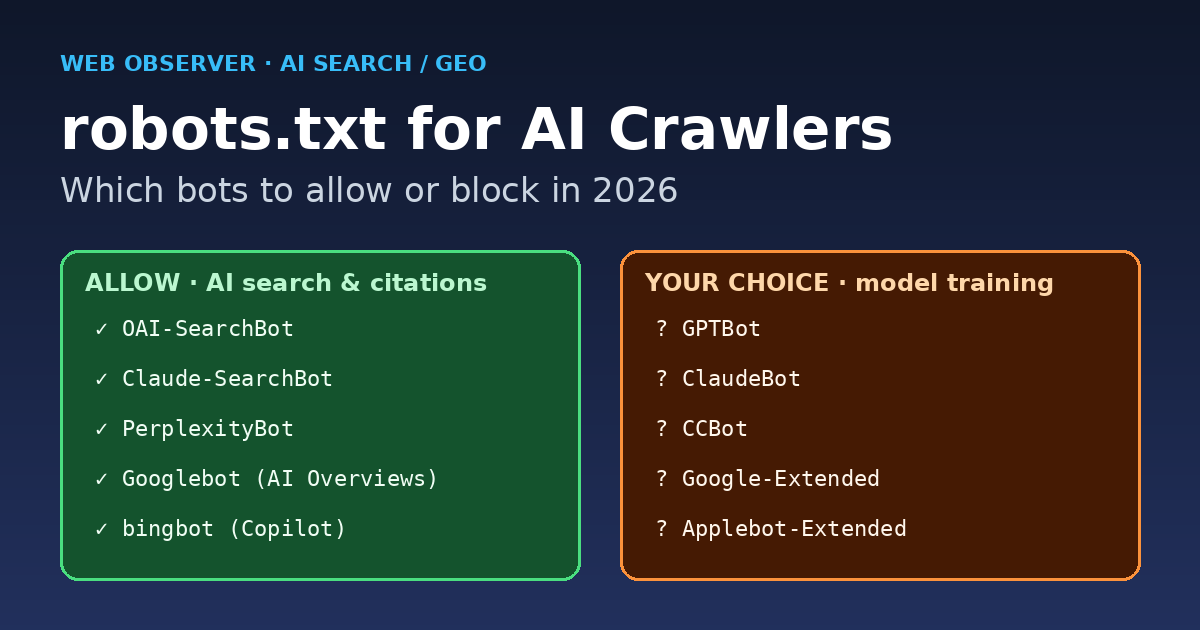
Short answer: In 2026 the big AI companies split their bots by job. One set crawls pages for model training (GPTBot, ClaudeBot, CCBot, and the Google-Extended and Applebot-Extended control tokens). Another set fetches pages so AI search and answer engines can cite and link you (OAI-SearchBot, Claude-SearchBot, PerplexityBot, plus regular Googlebot, bingbot and Applebot). Most publishers who want traffic should allow the search bots and decide separately on the training bots. Blocking everything with one wildcard rule usually removes you from AI answers and does nothing about training data that was already collected.
This guide covers each major AI user agent, what it does according to the vendor’s own documentation, copy-paste robots.txt templates for three common policies, how to apply them on WordPress (AIOSEO or a filter), and how to confirm the rules work by checking your server logs. If you are new to generative engine optimization, start with our GEO guide and come back here for the technical setup.
Why robots.txt matters more for AI search in 2026
A robots.txt file is a plain-text file at the root of your host (for example, https://example.com/robots.txt) that tells crawlers which paths they may fetch. The format is standardised in RFC 9309 (Robots Exclusion Protocol): a crawler follows the group that names its product token, otherwise it follows the User-agent: * group, and the most specific (longest) matching path rule wins.
Three things changed the stakes:
- Training and search are now separate switches. OpenAI, Anthropic and Perplexity each document a search crawler that is distinct from any training crawler. Blocking one does not block the other.
- AI answers send real visitors. ChatGPT search, Claude, Perplexity, Copilot and Google’s AI Overviews and AI Mode all show source links. If a search bot cannot fetch your page, it cannot cite it. You can measure that traffic in GA4. See our guide to tracking AI referral traffic.
- Blocking is common at the top of the web. A ContextFetch scan of the 10,000 most-linked domains (October 19, 2026) found that 13.6% of sites with readable rules block GPTBot site-wide and 20.3% block at least one of 17 AI crawlers. Search-focused bots were blocked much less often: 5.2% for OAI-SearchBot and 4.6% for Claude-SearchBot.
The takeaway: large publishers mostly block training bots and leave the citation bots alone. Small and mid-size sites that depend on discovery have even more reason to take the same approach.
AI crawler cheat sheet: what each bot does
The table below covers the user-agent tokens you are most likely to see in logs or want to control. The “Purpose” column is a summary of each vendor’s documentation, which is linked in the sections that follow.
| robots.txt token | Company | Purpose | Honors robots.txt? | Typical choice for a traffic-driven site |
|---|---|---|---|---|
| OAI-SearchBot | OpenAI | Surfaces sites in ChatGPT search answers | Yes (changes take ~24h) | Allow |
| GPTBot | OpenAI | Crawls content that may train OpenAI foundation models | Yes | Your choice |
| ChatGPT-User | OpenAI | Fetches a page when a ChatGPT user or GPT action asks | “robots.txt rules may not apply” | Allow |
| Claude-SearchBot | Anthropic | Indexes content to improve Claude search results | Yes | Allow |
| ClaudeBot | Anthropic | Collects content that may be used for model training | Yes (also honors Crawl-delay) | Your choice |
| Claude-User | Anthropic | Fetches pages for user-initiated Claude requests | Yes | Allow |
| PerplexityBot | Perplexity | Surfaces and links sites in Perplexity search; not for training | Yes (up to 24h) | Allow |
| Perplexity-User | Perplexity | User-triggered fetches inside Perplexity | Generally ignores robots.txt | Allow |
| Googlebot | Google Search, including AI Overviews and AI Mode | Yes | Allow (never block) | |
| Google-Extended | Control token for Gemini training and grounding; not a separate crawler | Yes | Your choice | |
| Applebot | Apple | Spotlight, Siri and Safari search; data may also feed Apple AI | Yes | Allow |
| Applebot-Extended | Apple | Control token: opt out of Apple foundation-model training | Yes | Your choice |
| bingbot | Microsoft | Bing search and Copilot grounding (controlled with meta tags) | Yes | Allow |
| CCBot | Common Crawl | Open web dataset widely used to train AI models | Yes | Your choice |
OpenAI: OAI-SearchBot vs GPTBot vs ChatGPT-User
OpenAI’s crawler documentation describes the settings as independent. Sites that block OAI-SearchBot will not be shown in ChatGPT search answers, although they can still appear as navigational links. Blocking GPTBot signals that your content should not be used to train OpenAI’s generative AI foundation models. If both are allowed, OpenAI may reuse one crawl for both purposes to avoid duplicate crawling. Search changes take roughly 24 hours to take effect. ChatGPT-User handles fetches that a user starts, and OpenAI says robots.txt rules may not apply to it. OpenAI publishes IP ranges for each bot (for example openai.com/searchbot.json) so you can check whether a request really came from OpenAI.
Anthropic: ClaudeBot, Claude-SearchBot, Claude-User
Anthropic’s help-center article lists three bots. Restricting ClaudeBot signals that future content should be excluded from training datasets. Disabling Claude-SearchBot or Claude-User “may reduce your site’s visibility” in Claude’s user-directed search. Anthropic honors the non-standard Crawl-delay directive and says that blocking by IP address may not reliably opt you out, because it can stop the bot from reading your robots.txt in the first place. Older tokens such as anthropic-ai and Claude-Web still appear in many robots.txt files, but the current documentation lists only the three bots above.
Google: Googlebot and the Google-Extended token
This is the bot people misunderstand most. In Google’s list of common crawlers, Google-Extended is “a standalone product token” with no user-agent string of its own. It controls whether content Google crawls can be used to train future Gemini models and for grounding in Gemini Apps and Vertex AI. Google states that it “does not impact a site’s inclusion in Google Search nor is it used as a ranking signal.”
AI Overviews and AI Mode are part of Google Search, so they rely on regular Googlebot. Disallowing Google-Extended will not remove you from AI Overviews. If you block Googlebot, you lose all of Google Search, not just the AI features. To limit how Google shows your content, use page-level controls such as nosnippet, data-nosnippet, max-snippet or noindex. Google covers these in its AI features documentation, and our summary of Google’s official AI search optimization guide explains what they mean for publishers.
Perplexity, Apple and Microsoft
Perplexity’s bot documentation says PerplexityBot surfaces and links websites in search results and “is not used to crawl content for AI foundation models.” Perplexity-User handles user-requested fetches and “generally ignores robots.txt rules.” Perplexity also publishes IP lists and sample WAF allow rules.
Apple’s Applebot page explains that Applebot powers search in Spotlight, Siri and Safari. Applebot-Extended does not crawl at all. It only tells Apple whether Applebot-crawled data may train its foundation models, and Apple says Applebot-Extended rules are not considered in Search ranking. One detail to watch: if your robots.txt mentions Googlebot but not Applebot, Applebot follows your Googlebot rules.
Microsoft has no separate Copilot crawler. Copilot draws on the Bing index that bingbot builds. Instead of robots.txt tokens, Bing uses robots meta tags: noarchive keeps a page out of Copilot answers and out of Microsoft’s model training, while nocache limits Copilot to the URL, title and snippet. Pages with either tag still appear in normal Bing search results.
Three robots.txt templates you can copy
Choose the policy that matches your business model. Each template keeps the default WordPress rules and adds AI-specific groups. A crawler obeys only the most specific group that names it, so any bot listed in its own group ignores the * rules. That is why every template repeats Disallow: /wp-admin/ where it matters.
Policy A: Maximum AI visibility (allow everything)
This is the right default for most blogs, SaaS marketing sites and affiliate or AdSense publishers whose growth depends on being discovered. You do not have to name AI bots at all. A standard WordPress file already allows them:
User-agent: *
Disallow: /wp-admin/
Allow: /wp-admin/admin-ajax.php

Sitemap: https://example.com/sitemap.xml
Policy B: Allow AI search, block AI training (most popular)
With this policy you can still be cited in ChatGPT, Claude, Perplexity and Google AI features, while opting out of the main training crawlers:
# AI training crawlers / tokens: opt out
User-agent: GPTBot
User-agent: ClaudeBot
User-agent: CCBot
User-agent: Google-Extended
User-agent: Applebot-Extended
Disallow: /

# AI search & citation crawlers: allow
User-agent: OAI-SearchBot
User-agent: Claude-SearchBot
User-agent: PerplexityBot
Disallow: /wp-admin/
Allow: /wp-admin/admin-ajax.php

# Everyone else (Googlebot, bingbot, Applebot...)
User-agent: *
Disallow: /wp-admin/
Allow: /wp-admin/admin-ajax.php

Sitemap: https://example.com/sitemap.xml
RFC 9309 allows several User-agent lines to share one group, so you do not need to repeat the rules for every bot. Keep in mind that Google-Extended here affects only Gemini training and grounding, not AI Overviews.
Policy C: Block AI except classic search engines
Paywalled publishers and sites with licensing deals sometimes choose this. Expect to lose citations in ChatGPT search, Claude and Perplexity:
User-agent: GPTBot
User-agent: OAI-SearchBot
User-agent: ClaudeBot
User-agent: Claude-SearchBot
User-agent: Claude-User
User-agent: PerplexityBot
User-agent: CCBot
User-agent: Google-Extended
User-agent: Applebot-Extended
Disallow: /

User-agent: *
Disallow: /wp-admin/
Allow: /wp-admin/admin-ajax.php
Even under Policy C, user-triggered fetchers such as ChatGPT-User and Perplexity-User may still reach your pages, because their vendors say robots.txt may not apply to them. If you need a hard block, you have to enforce it at the server or firewall, as described below.
Which policy should you choose?
| Site type | Recommended policy | Why |
|---|---|---|
| Ad-supported blog / niche publisher | A or B | Discovery drives revenue; AI citations add a new referral channel |
| SaaS, agency or developer docs | A | You want AI assistants to recommend and quote your product accurately |
| E-commerce | A or B | Product pages benefit from AI shopping and answer surfaces |
| Paywalled news / premium research | B or C | Protect licensable content; consider Bing nocache instead of a full block |
| Private, staging or intranet sites | Block everything + auth | robots.txt is not security; use passwords or IP allowlists |
How to edit robots.txt for AI crawlers on WordPress
WordPress does not ship a physical robots.txt file. It generates one dynamically. You have three clean ways to change it:
Option 1: All in One SEO (AIOSEO) robots.txt editor
- Go to All in One SEO → Tools → Robots.txt Editor and switch on Enable Custom Robots.txt.
- Use Add Rule to create a group for each user agent (for example
GPTBot, directive Block, value/), or use Import to paste one of the templates above. - AIOSEO also offers a Block AI Crawlers setting with per-crawler checkboxes. Review it carefully: an “All AI Crawlers” selection can include search and citation bots you may want to keep.
- Click Save Changes, then open
/robots.txtin a private window to confirm the output.
AIOSEO’s robots.txt documentation walks through the rule builder screen by screen. Yoast, Rank Math and SEOPress include similar editors.
Option 2: A small robots_txt filter
If you prefer code, add a must-use plugin or a snippet in your child theme. This version adds Policy B’s training block:
add_filter( 'robots_txt', function ( $output, $public ) {
    if ( ! $public ) {
        return $output; // site set to discourage search engines
    }
    $block = "User-agent: GPTBot\nUser-agent: ClaudeBot\nUser-agent: CCBot\n"
           . "User-agent: Google-Extended\nUser-agent: Applebot-Extended\nDisallow: /\n\n";
    return $block . $output;
}, 10, 2 );
Option 3: A static file
A physical robots.txt in your web root overrides the virtual file WordPress generates. This works, but plugin rule editors stop affecting the output, so document the change for your team.
Caching layers can serve an old copy of robots.txt for a while. If the live file does not change, clear your page cache (WP Rocket, LiteSpeed Cache and similar plugins), then fetch the file again.
Verify the rules: logs, testers and spoofed bots
robots.txt is a request, not an enforcement mechanism. After you deploy a policy, check what is actually happening:
- Parse the live file. Use the robots.txt report in Google Search Console (Settings → robots.txt) to confirm Google fetched the latest version without errors.
- Grep your access logs. On a typical Nginx or Apache server,
grep -Ei "gptbot|oai-searchbot|claudebot|claude-searchbot|perplexitybot|ccbot" access.log | awk '{print $1, $7, $9}'shows which bots hit which URLs and with what status codes. - Verify identity. Anyone can fake a user-agent string. Check the requesting IP against the vendor’s published ranges (OpenAI, Perplexity and Apple publish JSON lists) or confirm it with reverse DNS, as Google and Apple document.
- Watch for 403s on bots you allowed. Firewalls and bot-fight modes sometimes block allowed AI search crawlers, so robots.txt says yes while the server says no. Perplexity’s docs include sample WAF allow rules for this reason.
Hard blocking at the server (optional)
For bots that ignore robots.txt, or for aggressive scrapers that pretend to be AI bots, return a 403 at the web server. In Nginx, for example:
map $http_user_agent $block_ai_training {
    default        0;
    ~*GPTBot       1;
    ~*ClaudeBot    1;
    ~*CCBot        1;
}
server {
    # ...
    if ($block_ai_training) { return 403; }
}
Be careful with this approach. Anthropic warns that IP or server blocks can stop its bot from reading robots.txt, and user-agent matching cannot detect spoofed requests. If you already run Nginx in front of WordPress, our Nginx reverse proxy guide for WordPress shows where server-level rules like this belong.
Common robots.txt mistakes with AI bots
- Blocking Google-Extended and expecting to leave AI Overviews. It does not work that way. AI Overviews and AI Mode use Googlebot. Use
nosnippetornoindexif you really want out. - Blocking OAI-SearchBot or PerplexityBot by accident with a broad “block all AI” preset, then wondering why ChatGPT and Perplexity stopped citing you.
- Forgetting group precedence. Once a bot has its own group, it ignores the
*group, including your/wp-admin/rules. - Expecting robots.txt to delete past training data. The rules apply to future crawling. Vendors describe them as signals about future use.
- Using robots.txt to hide private content. A disallowed URL can still be indexed if other sites link to it, and the file itself is public. Use authentication instead.
- Never re-checking. Vendors add new tokens over time. Review your AI rules every quarter, when you check your AI Mode and Preferred Sources visibility.
FAQ
Should I block GPTBot?
Only if you object to your content being used to train OpenAI’s models. Blocking GPTBot does not remove you from ChatGPT search answers. That is controlled by OAI-SearchBot, according to OpenAI’s documentation. Most traffic-focused sites allow OAI-SearchBot, and many allow GPTBot as well.
Does blocking Google-Extended remove my site from AI Overviews?
No. Google says Google-Extended does not affect inclusion in Google Search and is not a ranking signal. It covers Gemini model training and grounding in Gemini Apps and Vertex AI. AI Overviews and AI Mode rely on Googlebot and respect snippet controls such as nosnippet.
What is the difference between ClaudeBot and Claude-SearchBot?
ClaudeBot collects content that may be used for model training. Claude-SearchBot indexes content to improve Claude’s search results, and Claude-User fetches pages when a person asks Claude something. Anthropic says disabling the search and user bots may reduce your visibility in Claude.
Do AI crawlers actually obey robots.txt?
The automated crawlers from OpenAI, Anthropic, Google, Apple, Perplexity and Common Crawl say they do. User-triggered fetchers are the exception: OpenAI says robots.txt rules may not apply to ChatGPT-User, and Perplexity says Perplexity-User generally ignores them. Unknown or spoofed scrapers can ignore robots.txt completely, so check your logs and use server rules where needed.
How long until robots.txt changes take effect?
OpenAI and Perplexity both say about 24 hours for their search systems. Google generally caches robots.txt for up to 24 hours. Clear any page cache first so crawlers fetch the new version.