Verified on: July 11, 2026. OpenRouter may change its free-model availability, limits, and account policies at any time.
How to Use Free AI Models on OpenRouter in 2026
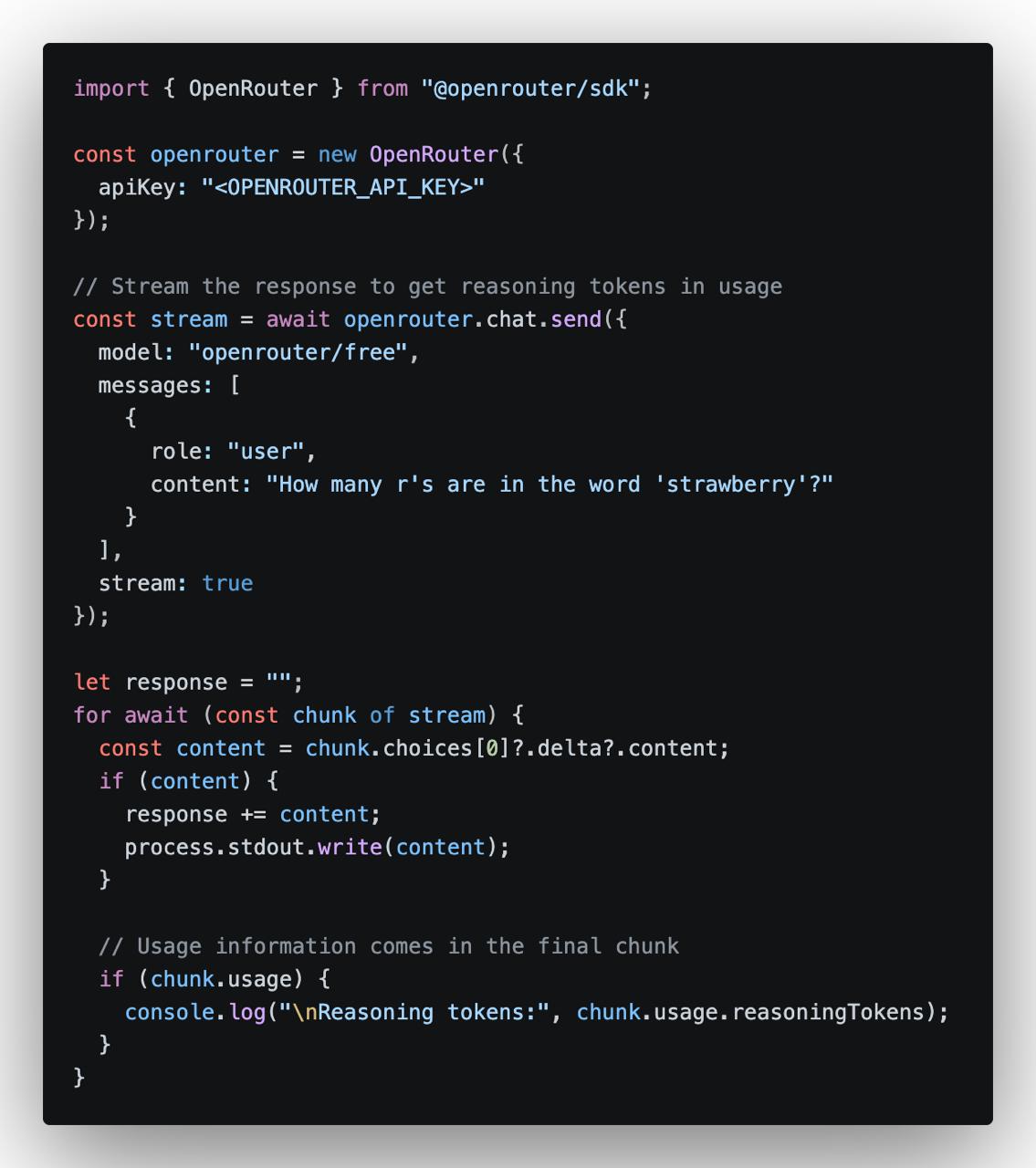
OpenRouter allows developers to access many AI models through one OpenAI-compatible API. It also provides a selection of free models that can be used for testing, learning, personal tools, and small AI projects.
You can use free models in two ways:
Use openrouter/free and let OpenRouter automatically select an available free model.
Choose a specific model whose ID ends with :free.
What Is OpenRouter Free?
The OpenRouter Free Models Router uses this model ID:
openrouter/free
When you send a request, OpenRouter chooses a compatible free model based on current availability and the features required by your prompt.
This is the easiest option for general testing. However, the underlying model may change between requests, so the writing style and response quality may not always be identical.
A specific free model usually has an ID ending with:
:free
For example:
provider/model-name:free
Because free-model availability changes frequently, copy the current model ID directly from the OpenRouter model page instead of using an old model name from another tutorial.
Check that the API key is correct and that the request contains:
Authorization: Bearer YOUR_API_KEY
404 or No Available Provider
The selected free model may no longer be available. Copy the latest model ID from OpenRouter or switch to openrouter/free.
429 Too Many Requests
You have reached a rate limit or daily free-model allowance. Wait before retrying and add request limits to your own application.
Is OpenRouter Free Suitable for Production?
Free models are useful for testing, small personal tools, demonstrations, and early product prototypes. They are less suitable for important production services because:
Free models may be removed or changed.
Provider capacity may be temporarily unavailable.
Response speed may vary.
The automatic free router may use different models.
Daily request limits are relatively low.
For a production application, use a stable model, add fallback models, set timeouts, monitor usage, and configure a maximum budget.
Security Tips
Keep the API key on the server.
Create separate keys for development and production.
Set a credit limit when creating a key.
Add user and IP rate limits to public AI endpoints.
Revoke the key immediately if it is exposed.
Do not send passwords or confidential data to free models.
Conclusion
OpenRouter is one of the easiest ways to test free AI models through a single API. Use openrouter/free when you want OpenRouter to select an available free model automatically, or choose a specific model ending in :free when you need more consistent results.
The basic process is simple: create an account, generate an API key, select a free model, and send requests to the OpenRouter OpenAI-compatible endpoint.
Free models are ideal for learning and prototyping, but their availability and limits can change. Always check the current OpenRouter model page before relying on a specific free endpoint.
Verification date: July 11, 2026. The NVIDIA Build interface, API key application process, endpoint availability, and official documentation referenced in this article were checked on this date. NVIDIA may update model availability, account requirements, rate limits, and free-access policies at any time.
NVIDIA is best known for GPUs, but the company also provides developers with hosted AI inference APIs through NVIDIA NIM and the NVIDIA Build platform.
By joining the free NVIDIA Developer Program, you can generate an NVIDIA API key and use eligible hosted NIM endpoints for AI development, experimentation, testing, and prototyping. You do not need to own an NVIDIA GPU or deploy a large language model on your own server to get started.
This guide explains how to create an NVIDIA account, generate a free NVIDIA AI API key, select an available model, test the key with cURL, and connect NVIDIA NIM to Python, Node.js, PHP, and OpenAI-compatible applications.
Important: NVIDIA describes these hosted APIs as free serverless APIs for development and as free NIM API access for prototyping. Free access should not be interpreted as a permanent, unlimited, production-grade service-level agreement.
What Is an NVIDIA AI API Key?
An NVIDIA AI API key is a credential used to authenticate requests sent to supported NVIDIA-hosted AI endpoints.
A generated key normally begins with the following prefix:
Many NVIDIA-hosted large language model endpoints use an API structure compatible with the OpenAI Chat Completions format. This means an application that already supports a custom OpenAI-compatible provider can often connect to NVIDIA by changing three values:
The API base URL
The API key
The model identifier
What Is NVIDIA NIM?
NVIDIA NIM, or NVIDIA Inference Microservices, is a collection of optimized inference services designed to simplify the deployment and use of AI models.
Instead of manually downloading model weights, configuring CUDA libraries, selecting an inference engine, and maintaining a GPU server, developers can use a standardized API to send prompts and receive model responses.
Depending on the model and licensing conditions, NIM can be used through:
NVIDIA-hosted serverless API endpoints
Downloadable NIM containers
Cloud GPU infrastructure
Private data centers
NVIDIA RTX workstations
Enterprise AI infrastructure
For this tutorial, we are using the NVIDIA-hosted development endpoints available through NVIDIA Build.
NVIDIA NIM APIs
What Can You Build with a Free NVIDIA AI API Key?
The NVIDIA API catalog includes multiple categories of AI models and services. The exact selection changes over time, but available categories may include:
Text generation and conversational AI
Reasoning models
Code generation and code analysis
Vision-language models
Image and visual-content processing
Embedding models
Reranking models
Speech and audio processing
Safety and moderation models
Biology, chemistry, climate, and scientific AI models
Typical development projects include:
AI chatbots
Customer-support assistants
Retrieval-augmented generation systems
Document summarization tools
Code assistants
WordPress AI plugins
Laravel or Node.js AI applications
Semantic search engines
Internal knowledge-base assistants
AI agent prototypes
Requirements
To apply for an NVIDIA API key, you generally need:
A working email address
An NVIDIA account
Membership in the NVIDIA Developer Program
A modern web browser
Acceptance of the applicable NVIDIA terms
Account-verification requirements can vary by region, account status, and NVIDIA’s current fraud-prevention policies. Follow the instructions displayed during registration.
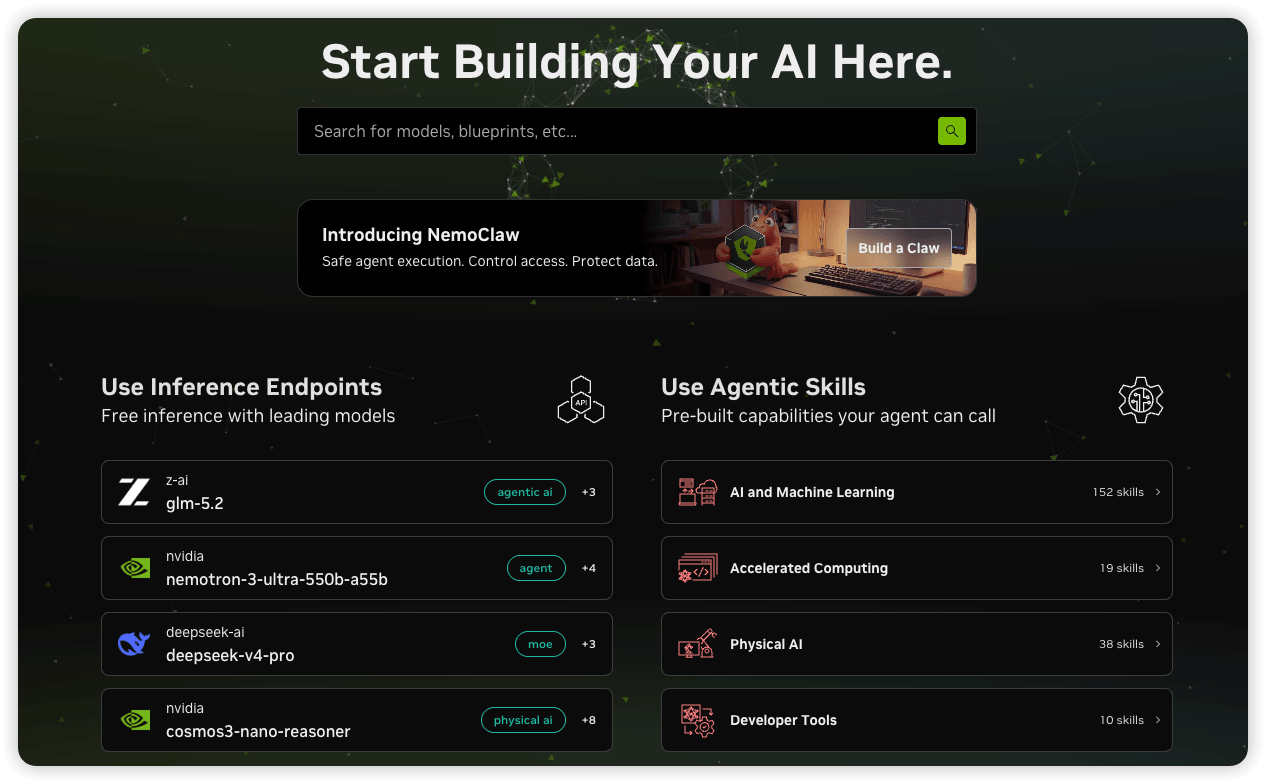
NVIDIA Build is the official catalog for exploring hosted AI endpoints, NIM models, blueprints, code samples, and related AI development resources.
Step 2: Create or Sign In to Your NVIDIA Account
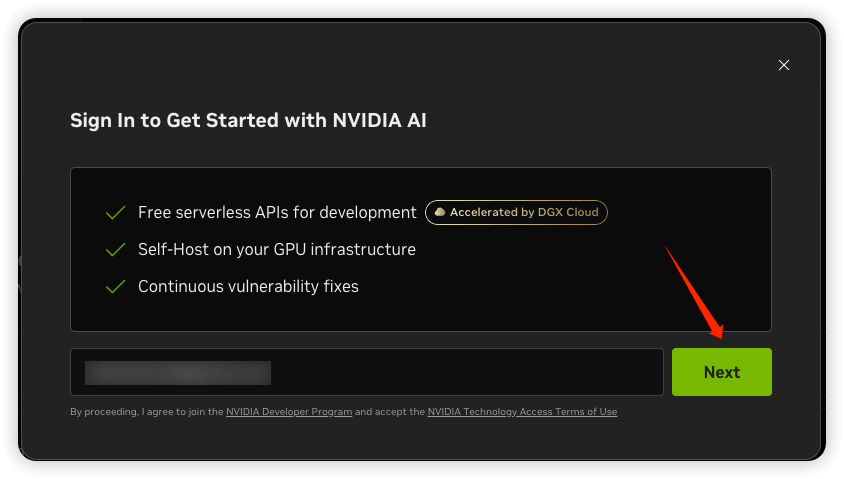
Click Sign In.
If you already have an NVIDIA account, enter your email address and continue with the login process.
If you do not have an account, enter your email address and complete the registration process. Depending on NVIDIA’s current interface, you may be asked to:
Enter your email address.
Verify your email.
The NVIDIA API key sign-in page currently states that users receive access to free serverless APIs for development and that proceeding joins the user to the NVIDIA Developer Program.
Sign in with an NVIDIA account and join the NVIDIA Developer Program.
Step 3: Open the NVIDIA API Key Settings Page
After signing in, You can normally create an API key in one of two ways:
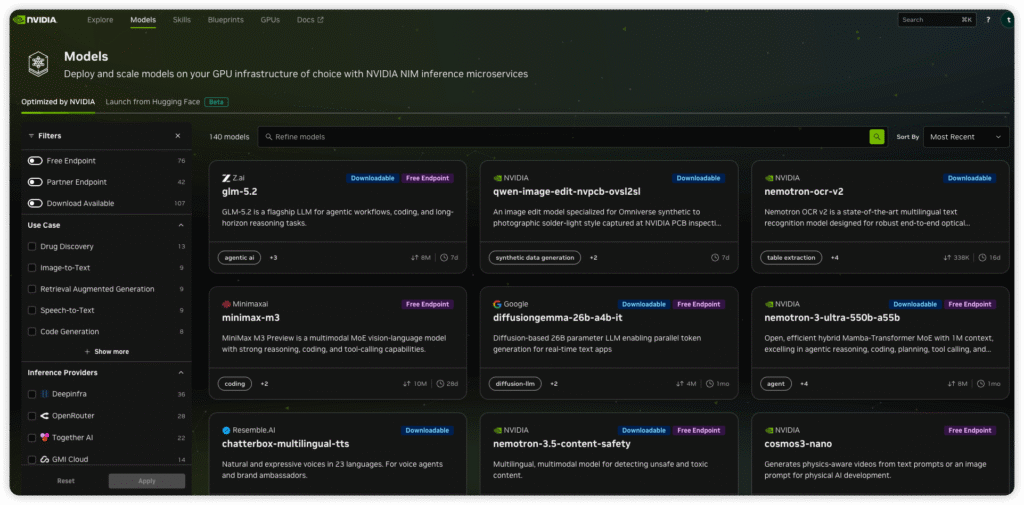
Search for a model that provides a hosted endpoint. NVIDIA may display labels such as:
Free Endpoint
Downloadable
Deprecated
Partner Endpoint
Preview
Label
Meaning
Free Endpoint
A hosted endpoint is available for eligible development or prototyping use.
Downloadable
The model or NIM can be deployed on supported infrastructure. This does not automatically mean a hosted endpoint is available.
Partner Endpoint
The endpoint may be operated or delivered through an NVIDIA partner.
Deprecated
The endpoint has been retired or is scheduled for removal.
Preview
The service is intended for evaluation and may change without production-level guarantees.
Do not assume that every model shown in the catalog can be called for free. Always open the individual model page and confirm its current endpoint status.
Check each model’s current endpoint status. A model listed in the catalog is not necessarily available as a free hosted endpoint.
Step 5: Open a Model and Review Its API Example
Click an available model. A model page may contain:
An interactive prompt area
A model card
API documentation
Python examples
Node.js examples
Shell or cURL examples
LangChain examples
The exact API model identifier
A Get API Key button
The model identifier is especially important. It may look similar to:
publisher/model-name
Always copy the identifier directly from the current model page. Do not rely on an old tutorial, video, or cached model list because NVIDIA can rename, replace, update, or deprecate endpoints.
Step 6: Generate the NVIDIA API Key
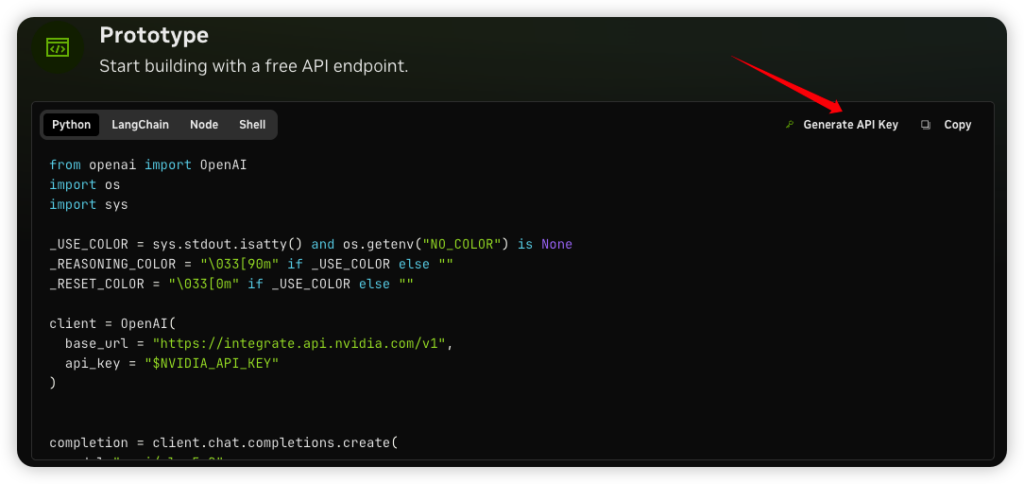
Click Get API Key, Generate API Key, or the equivalent button shown in your account.
If NVIDIA asks for a key name, use a descriptive name that identifies the project or environment:
Avoid using generic names such as test for every key. Descriptive names make it easier to revoke a compromised key without affecting unrelated applications.
If the interface provides an expiration option, select an appropriate validity period based on the project. A shorter expiration period reduces the risk of abandoned credentials remaining active.
Step 7: Copy and Secure the Key
After the key is generated, copy it immediately and store it securely.
nvapi-xxxxxxxxxxxxxxxxxxxxxxxxxxxxxxxx
Do not place the real key in:
Public GitHub repositories
Browser-side JavaScript
Public WordPress source code
Blog screenshots
Forum posts
Application error messages
Publicly accessible log files
Unencrypted configuration files
On Linux or macOS, store the key in an environment variable:
Testing with cURL is the fastest way to confirm that the account, key, endpoint, and model identifier are working before integrating the API into an application.
For OpenAI-compatible NVIDIA-hosted LLM endpoints, the commonly used base URL is:
Never hard-code a production API key directly in a public WordPress plugin or theme file. Use a server-side environment variable or a protected secret-management system.
Connect NVIDIA NIM to an OpenAI-Compatible Application
Many AI clients and frameworks support custom OpenAI-compatible providers. The typical configuration is:
API Base URL:
https://integrate.api.nvidia.com/v1

API Key:
nvapi-xxxxxxxxxxxxxxxxxxxxxxxx

Model:
REPLACE_WITH_THE_CURRENT_MODEL_ID
This can work with compatible chat interfaces, RAG tools, agent frameworks, workflow platforms, and custom applications.
However, compatibility is not guaranteed for every feature. A third-party application may expect:
A specific response format
A working /v1/models endpoint
Tool-calling support
Structured-output support
A specific multimodal message format
Parameters that the selected NVIDIA model does not support
Always test the official model-page example first. Once that succeeds, configure the same endpoint, model ID, and parameters in the third-party application.
How to Choose an NVIDIA AI Model
General Chat and Writing
Choose a general instruction-following model for:
Chatbots
Article drafting
Summarization
Translation
Customer support
Information extraction
Reasoning
Choose a reasoning-oriented model for:
Multi-step analysis
Mathematics
Complex coding problems
Planning
Agent workflows
Code Generation
Choose a coding model for:
Generating code
Debugging
Refactoring
Writing tests
Creating SQL queries
Explaining source code
Vision
Choose a vision-language model for:
Image understanding
Screenshot analysis
Chart interpretation
Visual question answering
OCR post-processing
Embeddings and Reranking
Choose an embedding or reranking model for:
Semantic search
RAG pipelines
Document retrieval
Similarity matching
Search-result reranking
Is the NVIDIA API Really Free?
NVIDIA’s official developer page currently describes free access to NIM API endpoints for prototyping, powered by NVIDIA infrastructure. The NVIDIA Build API key page also advertises free serverless APIs for development.
The safest interpretation is:
NVIDIA provides eligible developers with free hosted API access for development, learning, experimentation, testing, and prototyping, subject to current model availability, access policies, rate limits, and applicable terms.
Do not assume that the service includes:
Unlimited production traffic
A guaranteed request rate for every model
A permanent endpoint for every model
A formal production SLA
Unlimited tokens or inference credits
Automatic commercial-production rights for every model
Older NVIDIA forum posts and third-party tutorials may mention fixed credit allocations or a specific request-per-minute value. These figures have changed over time and may not apply uniformly to every model or account in 2026.
A June 2026 NVIDIA forum discussion indicated that free-tier rate limits can depend on the model, use case, and current platform traffic. For this reason, your application should rely on actual HTTP responses and current account information rather than assuming a universal rate limit.
Development Access vs. Production Deployment
Usage Type
Typical Purpose
Important Consideration
Hosted free endpoint
Learning, testing, evaluation, and prototyping
Subject to model availability, free-access policies, and rate limits
Self-hosted NIM
Private development or controlled infrastructure
You provide the GPU infrastructure and must comply with applicable licensing
Enterprise production
Commercial workloads requiring support and production guarantees
May require NVIDIA AI Enterprise licensing and production infrastructure
Before using an endpoint in a commercial production service, verify:
The NVIDIA service terms
The selected model’s license
Data-processing and privacy requirements
Production-use restrictions
Rate limits
Support availability
Required enterprise licensing
Common NVIDIA API Errors
401 Unauthorized
A 401 response usually means the API could not authenticate the request.
Check the following:
The API key was copied correctly.
The key does not contain leading or trailing spaces.
The key has not expired.
The key has not been revoked.
The request includes the Bearer prefix.
Correct header:
Authorization: Bearer nvapi-xxxxxxxx
Incorrect header:
Authorization: nvapi-xxxxxxxx
403 Forbidden
Possible causes include:
The account has not completed verification.
The selected model is unavailable to the account.
The endpoint has regional or policy restrictions.
Updated terms have not been accepted.
The selected model is not available as a hosted endpoint.
404 Model Not Found
A 404 or model-not-found response can occur when:
The model ID is misspelled.
The display name was used instead of the API model ID.
The model version has changed.
The endpoint has been deprecated.
A self-hosted model ID was used with a hosted endpoint.
Return to the current NVIDIA model page and copy its official Shell or Python example.
429 Too Many Requests
A 429 response means the request was rate-limited or the current usage allowance was exceeded.
A production-quality client should implement:
Exponential backoff
Random jitter
Concurrency limits
Request queues
Response caching
Maximum retry counts
Fallback behavior
Example Python retry logic:
import os
import random
import time

from openai import OpenAI, RateLimitError


client = OpenAI(
    api_key=os.environ["NVIDIA_API_KEY"],
    base_url="https://integrate.api.nvidia.com/v1",
)

for attempt in range(5):
    try:
        response = client.chat.completions.create(
            model="REPLACE_WITH_THE_CURRENT_MODEL_ID",
            messages=[
                {
                    "role": "user",
                    "content": "Hello",
                }
            ],
            max_tokens=100,
        )

        print(response.choices[0].message.content)
        break

    except RateLimitError:
        if attempt == 4:
            raise

        delay = (2 ** attempt) + random.random()
        print(
            f"Rate limited. Retrying in {delay:.1f} seconds."
        )
        time.sleep(delay)
400 Bad Request
A 400 response usually indicates an invalid request. Common causes include:
Malformed JSON
An unsupported parameter
An invalid message structure
A token limit that is too high
An invalid temperature value
An incorrect multimodal input format
Start with the exact example shown on the model’s API page. Modify one parameter at a time after the original example works.
Timeouts
A request may take longer when the model is busy, the prompt is large, the requested output is long, or the selected model performs extensive reasoning.
Configure reasonable connection and response timeouts:
No. NVIDIA-hosted endpoints run remotely. Your computer only sends HTTPS requests and receives responses.
Do I need to install CUDA?
No. CUDA is not required when you are calling an NVIDIA-hosted endpoint through its web API.
Is a credit card required?
The NVIDIA Build sign-in page currently advertises free serverless APIs for development. The basic NVIDIA Developer Program registration and hosted development access do not normally require deploying paid cloud GPU infrastructure. Account requirements can change, so follow the current registration interface.
Can one API key call multiple models?
A key can generally authenticate requests to multiple models that the account is authorized to access. However, each model still has its own endpoint status, supported parameters, availability, and usage conditions.
Can I put the API key in a WordPress page?
No. Never expose the key in a page, block, shortcode output, or browser-side JavaScript. Send the request from PHP on the WordPress server.
Can I use the free endpoint in a commercial application?
The free hosted endpoints are primarily described as development and prototyping services. Before launching a commercial production workload, verify the current NVIDIA terms, model license, production-use conditions, privacy requirements, and any NVIDIA AI Enterprise licensing requirements.
Why is a model from an older tutorial no longer available?
NVIDIA regularly changes its model catalog. A model may be renamed, updated, replaced, restricted, or deprecated. Always use the current model catalog rather than copying an old model ID.
Is there a universal requests-per-minute limit?
You should not assume one universal limit. NVIDIA forum guidance published in 2026 indicates that free-tier rate limits can depend on the model, use case, and current platform traffic. Handle HTTP 429 responses and inspect the latest account and model documentation.
Store the key in a server-side environment variable.
Test the endpoint with cURL.
Integrate it with Python, Node.js, PHP, or another compatible client.
Add authentication, rate limiting, retries, caching, and monitoring.
Recheck licensing and production requirements before commercial deployment.
Conclusion
NVIDIA Build provides one of the easiest ways to experiment with hosted AI models without purchasing a GPU or deploying an inference server.
The basic workflow is straightforward: create an NVIDIA account, join the Developer Program, choose an eligible model, generate an nvapi- key, and test the API with the example provided on the model page.
The API is especially useful for evaluating models, creating prototypes, building RAG demonstrations, testing AI agents, and adding experimental AI features to Python, Node.js, PHP, Laravel, or WordPress projects.
Remember that model availability and free-access rules can change. Treat the NVIDIA Build interface and official NVIDIA documentation as the authoritative sources, protect the API key on the server, and verify the licensing requirements before moving a prototype into production.
ChatGPT can support many time-consuming SEO tasks, including keyword research, content planning, on-page optimization, content refreshing, link building, and readability improvement.
However, the quality of the result depends heavily on the prompt. A vague instruction such as “write an SEO article” often produces generic content. A stronger prompt defines the target keyword, audience, search intent, structure, tone, length, and expected output format.
Below are practical ChatGPT prompts that you can adapt to your own website, client project, or content workflow.
Before Using ChatGPT for SEO
ChatGPT should be treated as an SEO assistant rather than a replacement for professional judgment.
Always review AI-generated content for:
Factual accuracy
Search intent alignment
Originality
Natural keyword usage
Brand voice
Outdated information
Unsupported statistics or claims
You should also verify keyword data, search volume, rankings, backlinks, and competitor information with appropriate SEO tools. ChatGPT may help organize and interpret data, but it should not invent current search metrics.
For developers or website owners who want to automate content-related tasks without immediately paying for a commercial AI API, see these guides:
These services can be useful for testing SEO tools, content assistants, WordPress integrations, and small automation projects. Free access, model availability, and usage limits may change, so they are generally better suited to experimentation and prototyping than critical production systems.
1. SEO Content Outline Prompts
A detailed outline helps ensure that an article covers the topic comprehensively without becoming repetitive.
Prompt: Create a Competitor-Based SEO Outline
Analyze the top-ranking pages for the keyword “[TARGET KEYWORD]” and create a detailed outline for a 2,000-word article.

Include:

- The likely search intent
- A recommended H1
- Relevant H2 and H3 headings
- Suggested word count for each section
- Important subtopics covered by competing pages
- Missing angles that could make the article more useful
- A conclusion
- An FAQ section based on common search questions

Keep the headings natural and descriptive. Do not repeat the exact target keyword unnaturally in every heading.

Split the outline into Part 1 and Part 2.
If your AI tool has browsing access, you can request an analysis of current search results. Without browsing access, provide the competing page titles, URLs, or extracted headings yourself.
Prompt: Create a Beginner-Friendly Outline
Create an SEO content outline for a beginner’s guide to yoga.

The article should cover:

- What yoga is
- Basic yoga poses
- Physical and mental benefits
- Common beginner mistakes
- Safety tips
- A simple weekly routine

Target keyword: “yoga for beginners”

Also provide:

- Five SEO title options
- A meta description under 155 characters
- Suggested H2 and H3 headings
- Relevant FAQs
- Recommended internal-link topics
2. Keyword Research Prompts
ChatGPT can help generate seed keywords and organize ideas, but it cannot reliably provide current search volume, competition, or ranking difficulty unless connected to a live data source.
Prompt: Generate Related Keywords
Generate a comprehensive list of keywords related to “[TARGET KEYWORD].”

Organize them into:

- Primary keywords
- Secondary keywords
- Long-tail keywords
- Question-based keywords
- Informational keywords
- Commercial keywords
- Transactional keywords
- Related entities and concepts

Remove obvious duplicates and group keywords with the same search intent.
Prompt: Build Keyword Clusters
Group the following keywords into topical clusters based on search intent and semantic similarity:

[PASTE KEYWORD LIST]

For each cluster, provide:

- A suggested pillar-page topic
- Supporting article ideas
- Primary keyword
- Secondary keywords
- Search intent
- Recommended content format

Flag keywords that are likely to compete with one another if published as separate pages.
Prompt: Find Long-Tail Keywords
Generate 30 long-tail keyword ideas related to “[TARGET TOPIC].”

Focus on keywords that indicate:

- A specific problem
- A comparison
- A beginner question
- A purchasing decision
- A local requirement
- A use case

Do not provide estimated search volume unless verified data is available.
3. SEO Topic Ideation Prompts
Use these prompts when planning a content calendar or identifying supporting topics around a core service.
Prompt: Generate Article Ideas
Suggest five high-potential SEO article topics for a yoga studio.

Core topics:

- Home yoga workouts
- Yoga for flexibility

For each topic, include:

- Suggested title
- Primary keyword
- Related long-tail keywords
- Search intent
- Target audience
- Recommended article angle
- Suggested call to action
Prompt: Find Content Gaps
I have already published articles about the following topics:

[PASTE EXISTING ARTICLE TITLES]

My main service or product is:

[DESCRIBE SERVICE]

Identify 15 relevant content gaps.

Exclude topics that substantially overlap with my existing articles. Group the recommendations by awareness, consideration, and conversion-stage search intent.
4. Search Intent Analysis Prompts
Understanding why someone searches for a keyword is more important than repeating the keyword throughout the page.
Prompt: Classify Search Intent
Analyze the likely search intent behind the keyword “[TARGET KEYWORD].”

Determine whether the primary intent is:

- Informational
- Navigational
- Commercial investigation
- Transactional
- Local

Explain what the user is probably trying to accomplish, what content format would best satisfy the query, and which sections should appear near the top of the page.
Prompt: Compare Similar Keywords
Compare the search intent of these keywords:

- [KEYWORD 1]
- [KEYWORD 2]
- [KEYWORD 3]

Explain whether they should target one page or separate pages.

Consider:

- Intent overlap
- Expected content format
- Audience stage
- Risk of keyword cannibalization
- Recommended internal-link relationship
5. SEO Content Writing Prompts
For better results, generate articles section by section instead of requesting an entire long-form article in one response.
Prompt: Write an Article Section
Write the section titled “[SECTION HEADING]” for an article targeting “[TARGET KEYWORD].”

Requirements:

- Audience: [TARGET AUDIENCE]
- Search intent: [SEARCH INTENT]
- Length: approximately [WORD COUNT] words
- Tone: [TONE]
- Include practical details and examples
- Use the target keyword only where natural
- Incorporate these related terms when relevant: [RELATED TERMS]
- Avoid generic introductions, filler, repetition, and unsupported claims
- Do not write the conclusion or sections outside this heading
Prompt: Improve Experience and Credibility
Review the following article and identify places where it could demonstrate stronger practical experience, expertise, and trustworthiness:

[PASTE ARTICLE]

Recommend specific improvements, such as:

- First-hand observations
- Original examples
- Clearer methodology
- Expert review
- Source attribution
- Author credentials
- Limitations or risks
- Updated screenshots or test results

Do not invent personal experience, qualifications, customer results, or statistics.
6. On-Page SEO Optimization Prompts
Avoid rigid keyword-density targets. A fixed instruction such as “use the keyword at exactly 3% density” can make an article repetitive and unnatural.
A better approach is to optimize for relevance, semantic coverage, and readability.
Prompt: Optimize an Existing Draft
Optimize the following article for the keyword “yoga for flexibility” without keyword stuffing:

[PASTE DRAFT]

Improve:

- Search intent alignment
- Title and introduction
- Heading structure
- Natural use of the primary keyword
- Related terminology
- Long-tail keyword coverage
- Paragraph length
- Readability
- Internal-link opportunities
- FAQ coverage

Preserve accurate and useful information. Highlight any statements that require fact-checking.
Prompt: Create SEO Metadata
Create five optimized title tags and three meta descriptions for the following page:

Page topic: [TOPIC]

Primary keyword: [KEYWORD]

Audience: [AUDIENCE]

Search intent: [INTENT]

Keep title tags concise and distinct. Keep each meta description under approximately 155 characters and include a clear benefit without using clickbait.
Prompt: Improve Heading Structure
Review the headings below and reorganize them into a logical H1, H2, and H3 hierarchy:

[PASTE HEADINGS]

Fix:

- Duplicate headings
- Unclear hierarchy
- Missing subtopics
- Keyword stuffing
- Headings that do not match the section content

Return the revised heading structure only.
7. Readability and Editing Prompts
AI is particularly useful for simplifying difficult writing and removing repetitive phrasing.
Prompt: Simplify Complex Content
Rewrite the following content for a general audience at approximately a seventh- to eighth-grade reading level:

[PASTE CONTENT]

Use:

- Shorter sentences
- Familiar words
- Clear transitions
- Short paragraphs
- Direct explanations

Preserve technical accuracy and define any specialist terms that cannot be removed.
Prompt: Improve Awkward Writing
Edit the following draft to improve clarity, flow, and natural phrasing:

[PASTE DRAFT]

Remove:

- Repetition
- Unnecessary filler
- Awkward transitions
- Excessive passive voice
- Generic AI-style phrases

Preserve the original meaning, factual claims, and tone.
Prompt: Make Content More Engaging
Improve the following article by suggesting appropriate places to add:

- Two verified statistics
- One simple analogy
- One practical example
- One short checklist
- An FAQ section

[PASTE ARTICLE]

Do not invent statistics. Clearly mark where an external source is required.
8. Internal Linking Prompts
Internal links help users discover related content and help search engines understand the relationship between pages.
Prompt: Find Internal-Link Opportunities
Review the following article and identify internal-link opportunities:

[PASTE ARTICLE]

Available pages:

[PASTE PAGE TITLES AND URLS]

Return a table containing:

- Source sentence or section
- Recommended destination page
- Natural anchor text
- Reason the link is relevant

Avoid using the same anchor text repeatedly and do not suggest irrelevant links.
Prompt: Build a Topic-Cluster Linking Plan
Create an internal-linking plan for the following pillar page and supporting articles:

Pillar page: [TITLE AND URL]

Supporting pages:

[LIST TITLES AND URLS]

Explain which pages should link to one another and recommend descriptive anchor text. Prioritize useful navigation rather than adding links solely for SEO.
9. External Link and Source Prompts
External links should support factual claims and direct readers to authoritative resources.
Prompt: Recommend External Sources
Recommend three authoritative external sources for an article about “[TOPIC].”

The sources should:

- Support important factual claims
- Come from primary or highly trusted organizations
- Not directly compete with the article’s main commercial objective
- Be current where recency matters

For each source, provide:

- The organization or publication
- The type of information it supports
- Recommended anchor text
- The section where it should be cited

Do not invent URLs or sources.
10. Link-Building Prompts
ChatGPT can help personalize outreach, but mass-produced emails usually perform poorly.
Prompt: Create a Personalized Outreach Email
Write a concise outreach email to the editor of “[WEBSITE NAME].”

I want to recommend my resource:

[RESOURCE TITLE AND URL]

Relevant page on their website:

[PAGE TITLE AND URL]

Explain specifically why my resource would add value for their readers. Do not use exaggerated praise, pressure, or generic phrases. Keep the email under 150 words.
Prompt: Find Linkable Asset Ideas
Suggest ten linkable asset ideas for a website in the “[INDUSTRY]” industry.

Include a mix of:

- Original research
- Calculators
- Templates
- Checklists
- Interactive tools
- Data visualizations
- Technical reference materials

For each idea, explain who might link to it and why.
11. FAQ Generation Prompts
FAQs should answer real user questions, not merely create extra keyword-heavy text.
Prompt: Generate Useful FAQs
Generate ten FAQs for an article targeting “[TARGET KEYWORD].”

Focus on:

- Common beginner questions
- Important limitations
- Costs
- Safety concerns
- Comparisons
- Implementation questions

Provide concise answers of 40–80 words. Avoid repeating information already covered in the main article.
12. Content Repurposing Prompts
One well-researched article can be adapted for several channels, but each version should match the platform.
Prompt: Create a Social Summary
Create a concise social media summary of the following article:

[PASTE ARTICLE]

Platform: X/Twitter

Maximum length: 100 words

Include:

- The main benefit
- One practical takeaway
- A reason to read the full article

Do not use misleading claims or excessive hashtags.
Prompt: Convert an Article into a Newsletter
Convert the following article into an email newsletter:

[PASTE ARTICLE]

Use:

- A concise opening
- Three key takeaways
- One practical recommendation
- A natural call to action

Keep the newsletter under 500 words and avoid copying the article introduction word for word.
13. Content Refresh Prompts
Older pages often lose traffic because examples, screenshots, tools, product details, or search intent have changed.
Prompt: Create a Content Refresh Plan
Review the following article and create a content refresh plan:

[PASTE ARTICLE]

Identify:

- Potentially outdated information
- Broken or weak references
- Missing subtopics
- Sections that are too thin
- Repetitive sections
- Opportunities for updated examples
- New FAQs
- Internal-link opportunities
- Claims requiring current verification

Prioritize the recommendations by expected impact.
14. Technical SEO Explanation Prompts
ChatGPT can explain technical SEO concepts or help analyze supplied data, but important changes should be tested before implementation.
Prompt: Explain a Technical SEO Problem
Explain the following technical SEO issue in clear language:

[DESCRIBE ISSUE]

Include:

- What the issue means
- Common causes
- How it can affect crawling, indexing, or rankings
- How to diagnose it
- Possible fixes
- Risks to consider before making changes

Provide separate recommendations for WordPress and custom-built websites where applicable.
Prompt: Review Robots.txt
Review the following robots.txt file:

[PASTE ROBOTS.TXT]

Identify directives that may accidentally block important pages, CSS, JavaScript, images, or search-engine crawlers.

Explain each problem and provide a corrected version. Do not assume that robots.txt can remove already indexed pages from search results.
A Reusable Master Prompt for SEO Content
The following template can be adapted to most SEO writing projects:
Act as an experienced SEO content strategist and editor.

Create a detailed article about “[TOPIC]” targeting the primary keyword “[PRIMARY KEYWORD].”

Project details:

- Audience: [AUDIENCE]
- Search intent: [INTENT]
- Country or market: [MARKET]
- Desired length: [WORD COUNT]
- Tone: [TONE]
- Business goal: [GOAL]

Requirements:

1. Recommend an SEO title and meta description.
2. Create a logical H1, H2, and H3 structure.
3. Cover the topic comprehensively without unnecessary repetition.
4. Use the primary keyword and related terminology naturally.
5. Include practical steps, examples, limitations, and common mistakes.
6. Add an FAQ section addressing genuine user questions.
7. Identify claims that require current sources or fact-checking.
8. Suggest relevant internal-link opportunities.
9. Avoid fabricated statistics, quotes, experience, and credentials.
10. Write for readers first rather than targeting a fixed keyword density.

Before writing the complete article, return the proposed outline for review.
Final SEO Prompt Tips
For more useful AI-generated SEO content:
Define the audience and search intent.
Provide source material whenever possible.
Include your product, service, or brand context.
Specify the required output format.
Ask the AI to identify uncertain claims.
Generate and review long articles section by section.
Avoid strict keyword-density requirements.
Fact-check statistics, quotes, product details, and current policies.
Add original expertise, examples, screenshots, or test results.
Edit the final draft so it reflects a consistent human voice.
Conclusion
ChatGPT can accelerate many SEO tasks, from keyword clustering and article planning to editing, internal linking, and content refreshing. Its greatest value is not simply producing more text—it is helping marketers organize ideas, identify gaps, and improve existing workflows.
The most effective prompts clearly define the task, audience, search intent, constraints, and desired output. AI-generated recommendations should still be reviewed by a human, supported by reliable sources, and refined with genuine experience.