Short answer: Vector RAG is still the right default for most site owners and content teams. GraphRAG (or hybrid vector-plus-graph retrieval) pulls ahead when answers depend on multi-hop relationships, entity connections, and document structure—exactly the kind of questions that break naive chunk search. In 2026 industry discussion of UK National Innovation Centre for Data (NICD) benchmarking, a graph-enhanced setup was reported at roughly 63 fine-grained truthfulness versus about 35 for vector-only RAG on hard multi-hop questions—an approximate 80% relative lift on that score, with more than double the answer rate on the tested set. Those numbers are useful orientation, not a guarantee for every knowledge base.
If you are building documentation, product help, internal wikis, or content clusters that feed AI Overviews and chat answers, the retrieval choice shapes how trustworthy those answers feel. This guide compares GraphRAG vs Vector RAG in practical terms for people who own sites and content systems—not as a research paper rewrite.
What vector RAG actually does (and where it stalls)
Classic retrieval-augmented generation embeds text chunks into a vector index, retrieves nearest neighbors for a query, and stuffs those passages into the prompt. It is fast to ship, cheap to operate at small scale, and good at “find me the paragraph that sounds like this question.”
Vector RAG shines when:
Questions map cleanly to a single page, FAQ, or section.
Your corpus is mostly unstructured prose without dense cross-references.
Latency and indexing simplicity matter more than multi-document reasoning.
You are prototyping an AI search or support assistant and need a baseline that works this week.
It stalls when the right answer requires chaining facts: “Which products share a dependency with X and are deprecated after version Y?” Similarity search may return relevant-looking chunks that never connect the entities. The model then fills gaps—hallucinating links or omitting critical constraints. That failure mode is why graph-aware retrieval keeps showing up in AI search and agent design conversations.
What GraphRAG adds without reinventing your stack
GraphRAG (used here in the broad industry sense: retrieval that combines semantic search with graph structure) gives the model explicit relationships—sections inside documents, entities linked across pages, hierarchies, citations, product–feature–version edges. The NICD write-up and related workshop material emphasize that even a simple document-structure graph (titles, sections, paragraphs, links)—not only a hand-curated enterprise knowledge graph—can improve complex question answering when paired with vector retrieval.
According to NICD’s public summary of the work (study title: Reducing Hallucinations in Complex Question Answering using Simple Graph-based Retrieval-Augmented Generation; preprint discussed via arXiv HTML), researchers compared vector-only agentic RAG, vector-plus-graph RAG, and a zero-shot LLM on 510 complex MoNaCo-style questions. Reported highlights widely cited in industry coverage include roughly 80% higher fine-grained truthfulness for the graph-enhanced setup versus vector-only (about 63 vs 35 on their fine-grained score), more than 2× questions answered (on the order of ~29% to ~66% answer rates in summary materials), and improved precision/recall balance—with a modest token cost increase. Treat these as benchmark results under specific models and evaluation choices, not universal product KPIs.
Better models alone cannot solve reliability. The right evidence, retrieved with the right structure, still decides whether an AI answer is usable in production.
Practical framing for content and platform teams
GraphRAG vs Vector RAG: side-by-side for decision makers
Dimension
Vector RAG
GraphRAG / hybrid
Best query shape
Single-hop, topical similarity
Multi-hop, entity + structure
Setup cost
Low: chunk + embed + index
Medium: graph build/extract + tools
Maintenance
Re-embed on content change
Keep graph edges in sync with content
Hallucination risk on hard Qs
Higher when evidence is fragmented
Lower when paths are explicit (in NICD-style tests)
Token / latency profile
Often leaner
Slightly heavier; can answer more often
GEO / AI Overview fit
Strong for clear page answers
Strong when entity relationships must stay consistent
When to choose
Most blogs, FAQs, simple docs
Docs hubs, policies, catalogs, multi-source KB
A practical decision framework (site owners and content teams)
Stay on vector RAG if…
Your AI answers mostly paraphrase a single canonical page.
You lack clean entity naming or consistent internal linking.
Engineering capacity is limited and you need a monitored MVP.
Evaluation shows high groundedness already on your real user questions.
Move toward GraphRAG or hybrid if…
Support tickets and search logs show multi-condition questions (“A and B but not C”).
Content lives across product docs, changelogs, and policy pages that must be combined.
You already maintain a taxonomy, schema, or entity model you can project into a graph.
Human review flags omissions and invented relationships more than missing keywords.
Hybrid is the 2026 default for serious knowledge bases
Most production systems will not abandon vectors. They will keep semantic recall for “get candidate passages,” then use graph hops to expand, constrain, or order evidence. That pattern matches how the NICD comparison framed vector-plus-graph tools alongside semantic search—not graph instead of embeddings.
How this maps to GEO and AI Overviews
Generative Engine Optimization (GEO) is less about tricking a chatbot and more about making extractable, attributable evidence. Retrieval quality inside your own RAG stack and how public AI systems cite the open web share the same fundamentals: clear entities, explicit relationships, and scannable structure.
If you are building topical authority for AI search visibility, start with the foundations in Google’s Official Guide to AI Search Optimization 2026 and the broader playbook in The Only GEO Guide You’ll Ever Need. Those pillars cover how to write for citation-friendly answers. GraphRAG vs Vector RAG is the systems counterpart: how your site’s knowledge is stored and retrieved when an assistant—yours or someone else’s—needs to combine facts.
For GEO-minded content teams, retrieval choice shows up as:
Entity clarity: Consistent names for products, APIs, policies, and people reduce graph extraction noise and help AI systems resolve “who/what” mentions.
Relationship-rich linking: Internal links, breadcrumbs, and “related docs” sections are human UX and future graph edges.
Answer-first sections: Direct definitions and decision tables are easier for both vector chunking and section-level graphs to retrieve intact.
Update hygiene: Stale vectors and stale edges both cause confident wrong answers—treat re-index and graph refresh as the same release checklist.
Content patterns that make either approach work better
Whichever retrieval stack you choose, publishers control the raw material. AI search systems—and your own RAG pipelines—prefer content that already encodes structure.
Definition blocks near the top: One or two sentences that answer the query directly before narrative setup.
Comparison tables: Explicit rows for trade-offs reduce multi-hop burden because the relationship is on one page.
Versioned facts: Label “as of” dates for APIs, pricing, and policy so the graph and the vector index can age out stale chunks together.
Stable anchors: Keep H2 IDs predictable so section-level retrieval and human deep links stay aligned.
Authoritative outbound cites: Link primary research (for example NICD or arXiv pages) instead of recycled blog summaries when you reference benchmarks.
These patterns help vector RAG retrieve cleaner chunks and give GraphRAG higher-quality nodes and edges to walk. They also improve how public generative engines summarize your pages when they do cite you.
A 30-day pilot plan for teams without a research lab
You do not need a VLDB workshop paper to learn whether graph tools help your corpus. Run a contained pilot:
Week 1: Freeze a 40-question eval set from real tickets or search logs. Score vector-only RAG with human review on groundedness and omissions.
Week 2: Build a document-structure graph for one high-value collection (docs + changelog + FAQ). Expose 2–3 graph tools to the same agent.
Week 3: Re-run the eval. Keep latency and token logs. Interview two support or content owners on answer usefulness.
Week 4: Decide: stay vector, hybrid on that collection only, or expand graph coverage. Document failure classes so the next sprint is not guesswork.
If the pilot shows weak lift, invest in content structure and chunking before adding graph complexity. If lift concentrates on multi-hop questions, expand graph coverage only for those content types.
Implementation checklist for a content-fed knowledge base
Use this as a lightweight rollout plan before you buy another platform.
Inventory question types. Sample 50–100 real queries. Label single-hop vs multi-hop. If multi-hop is rare, optimize vector RAG first.
Normalize entities in content. One canonical name per product/feature; avoid synonym soup in H1s.
Chunk with structure, not only tokens. Prefer section-aware chunks (H2/H3 boundaries) so a document graph can attach cleanly.
Add a minimal graph layer. Document → section → paragraph, plus explicit “depends on / supersedes / related to” edges where authors can maintain them.
Evaluate with refusal-aware scoring. Prefer “I don’t know” over fluent invention. Track groundedness, omission, and multi-hop success separately.
Keep humans in the loop for high-stakes domains. Compliance, medical-adjacent, and financial answers need review paths regardless of retrieval style.
Instrument token and latency cost. Graph hops that double answer rate at ~10% more tokens can still be a win; hops that add cost without lift are not.
Common myths to ignore
“GraphRAG always beats vector RAG.” Not on easy single-hop FAQs. Benchmarks that stress multi-hop will favor graphs; your traffic mix may not.
“You need a perfect enterprise knowledge graph first.” Document-structure graphs and light entity links already help in reported studies—start small.
“Better prompts replace retrieval upgrades.” Prompts cannot invent missing evidence. They can only rearrange what retrieval provides.
“Publishing longer posts fixes AI answers.” Length without entities, structure, and freshness still chunks poorly.
What “winning” means for AI search in 2026
For most publishers and product sites, the winner is not a brand name—it is a retrieval policy: vector-first for breadth, graph-assisted for hard questions, continuous evaluation against real user asks. Public AI Overviews and answer engines reward the same clarity you need inside your own RAG: unambiguous entities, stable URLs, and passages that stand alone when cited.
If you only do one thing after reading this: classify last month’s AI-assistant failures. If they are “wrong neighbor paragraph,” improve chunking and embeddings. If they are “missed a relationship,” pilot a hybrid GraphRAG path on that subset of content first.
FAQ: GraphRAG vs Vector RAG
Is GraphRAG replacing vector databases in 2026?
No. Most serious deployments keep a vector index for semantic recall and add graph tools or graph-expanded context for multi-hop reasoning. Think hybrid, not replacement.
Do I need Neo4j or a commercial graph DB to benefit?
Not necessarily for a pilot. Teams start with document-structure graphs and lightweight relationship stores. Choose a managed graph when you need scale, access control, and production tooling—not on day one of an experiment.
How does this affect on-page SEO and GEO?
Retrieval architecture does not replace on-page SEO, but content that is entity-clear and well-structured feeds both public AI citation and private RAG quality. Align your writing with GEO best practices while you improve retrieval behind the scenes.
What should I measure after a GraphRAG pilot?
Track groundedness, hallucination/omission rates on a fixed question set, answer rate (including refusals), human edit rate, latency, and token cost. Compare against your vector-only baseline on the same questions.
When is vector RAG “good enough” forever?
When your corpus and questions stay mostly single-hop, evaluation scores are stable, and business risk from omissions is low. Revisit when you add multi-product workflows, policy crosswalks, or agentic tools that chain steps.
If you want to optimize for Google AI Overviews and other generative AI features in Search, Google’s official answer is blunt: keep doing strong SEO. Retrieval-augmented generation (grounding) and query fan-out still pull from the same Search index and ranking systems. New file formats and “write for the model” tricks do not move the needle on Google.
This article walks through Google Search Central’s AI optimization guide and the companion docs on AI features, then turns them into a practical checklist. It complements our process-focused playbook, The Only GEO Guide You’ll Ever Need, by anchoring on what Google itself says to do—and what to skip—in 2026.
SEO still matters for generative AI search
Google’s guide opens with a direct question: is SEO still relevant for generative AI search? Yes. AI Overviews and AI Mode are rooted in core Search ranking and quality systems. Two techniques explain why classic SEO still applies:
Retrieval-augmented generation (RAG / grounding): Google retrieves relevant, up-to-date pages from the Search index, reviews specific information on those pages, then generates a response with prominent, clickable links to supporting sites.
Query fan-out: The model issues concurrent related queries to gather more context. A question like “how to fix a lawn full of weeds” can spur fan-outs such as herbicide options, chemical-free removal, and prevention tips—each with its own results set.
That architecture is why ranking for the searches behind an AI answer still matters. For a hands-on way to map those hidden searches and build pillars around them, use the GEO process in our GEO guide. Google’s framing is simply: optimizing for generative AI search is still optimizing for Search.
How Google views “AEO” and “GEO”
You will see “answer engine optimization” (AEO) and “generative engine optimization” (GEO) used across the industry. From Google Search’s perspective, those labels describe the same job as SEO: improve visibility in the search experience people already use. If you evaluate third-party AEO/GEO products, Google advises matching their claims against official guidance—not against invented “AI ranking factors.”
What Google wants you to do
1. Create non-commodity, people-first content
Google says unique, compelling content will likely influence presence in generative AI search more than any other tactic in the guide. Non-commodity pages share traits like:
A real point of view — first-hand experience, original data, or expert judgment, not a rehash of what every other page already says.
Helpful structure for humans — clear sections and headings so readers (and systems that cite passages) can find the answer quickly.
Supporting media when it helps — high-quality images and video following existing image and video SEO practices.
Focus on user satisfaction — avoid manufacturing a separate page for every fan-out phrasing; that can tip into scaled content abuse.
If you use generative AI while drafting, Google still expects the finished work to meet Search Essentials and spam policies. For prompt ideas that support research and editing—without inventing metrics—see Useful ChatGPT Prompts for SEO.
2. Keep technical crawlability boringly solid
Eligibility for AI features is not a new checklist. A page must be indexed and eligible to appear in Google Search with a snippet, meeting the technical requirements for Search. Sites must also remain included in Search generative AI features via Search Console controls.
Practical priorities that still apply:
Allow crawling where you want discovery; follow crawl-budget guidance on large, frequently updated sites.
Prefer readable structure and semantic HTML for people (including accessibility), without obsessing over “perfect” markup.
If you rely on JavaScript, follow JavaScript SEO best practices so important text is available.
Improve page experience: mobile-friendly layout, reasonable latency, clear main content.
Reduce unnecessary duplicate URLs so crawl and indexing effort go to pages you care about.
3. Use business and product surfaces when they fit
Where relevant, keep Merchant Center feeds and Google Business Profile details accurate. Generative responses can surface products and local business information. That is standard Google presence work—not a special “AI schema pack.”
Myths Google says you can skip
The mythbusting section of the official guide is the most useful part for teams drowning in AI SEO Twitter advice. Google explicitly says you can ignore these for Google Search:
llms.txt and other “special” AI files
llms.txt myth: You do not need new machine-readable files, AI text files, or Markdown formats to appear in Google Search generative AI features. Google Search does not use them for ranking or inclusion. Maintaining llms.txt for other tools is fine; it neither helps nor hurts Google Search visibility.
“Chunking” content for AI
There is no requirement to chop pages into tiny fragments so models can understand them. Google systems can handle multiple topics on one page and surface the relevant piece. Page length should serve your audience, not an imagined chunk size.
Rewriting everything “for AI”
You do not need a special AI voice or exhaustive long-tail variants. Models understand synonyms and related intent. Writing clearly for people remains the strategy.
Inauthentic mentions
AI features can reflect what the web says about products and brands, but chasing fake mentions is not a reliable path. Quality systems and spam defenses still apply. Earn real coverage instead of manufacturing noise.
Overfocusing on schema for AI Overviews
Structured data is not required for generative AI search, and there is no special schema.org type you must add for AI Overviews. Keep using structured data for rich results eligibility when it matches visible content—just do not treat it as an AI-Overview switch.
Measure with Search Console’s Generative AI performance report
Guesswork is optional. Google rolled out the Generative AI performance report in Search Console to all websites worldwide as of August 31, 2026. Use it to:
Track organic impressions from Search generative AI features over time.
See which pages earn the most (or fewest) impressions in those features.
Break down origin by country and device.
The report currently covers impressions for AI Overviews and AI Mode (Search Labs experiments are excluded). If you do not see the report, you may lack enough generative AI impressions yet—or your property may be excluded via the Search generative AI control. Google also warns that no third-party tool has access to internal ranking or AI systems; treat external “AI rank” dashboards as workflow helpers, not ground truth.
Publisher-friendly link updates in AI Overviews (October 2026)
Visibility is not only about being retrieved—it is also about whether users can click out. In mid-October 2026, Google announced updates intended to make AI Mode and AI Overviews better at connecting people to the open web: more inline links (often higher in responses), testing of a top section that highlights one or two official task-critical links, expanded timely-article carousels (including Preferred Sources), and more clickable designs for related articles and creator context. Coverage from Google’s own Search blog and industry reporting (for example Search Engine Roundtable and Search Engine Land around October 15, 2026) framed the changes as publisher-friendly link surface improvements—not a new optimization loophole.
Practical takeaway: keep producing citable, crawlable pages worth linking. Link UI can change; eligibility still rests on indexing, quality, and inclusion controls.
Practical checklist: optimize for Google AI Overviews in 2026
Confirm eligibility: pages indexable with snippets; site included in Search generative AI features in Search Console.
Ship non-commodity pages: original insight, clear answers near the top, honest comparisons and case detail where you have them.
Map a small set of buyer questions and the fan-outs behind them (process detail in the GEO guide)—then win those searches with on-site or off-site pillars.
Fix crawl and experience basics: robots access, internal links, text availability, Core Web Vitals hygiene, low duplicate sprawl.
Skip the myths: no mandatory llms.txt, no forced chunking, no AI-only rewrites, no fake mention campaigns, no “AI schema” panic.
Measure weekly: Generative AI performance report for impressions by page; classic Performance report for clicks and queries; avoid tools that claim secret Google AI metrics.
Refresh winners: update dates and substance on pages that already earn generative AI impressions or classic rankings on fan-out queries.
FAQ
Do I need different SEO for AI Overviews than for classic blue links?
No. Google’s documentation states that foundational SEO best practices remain the path into AI Overviews and AI Mode. There are no additional technical requirements beyond being indexable and snippet-eligible, plus remaining included in generative AI features.
Is GEO or AEO different from SEO in Google’s view?
Google treats optimizing for generative AI search as optimizing for Search. GEO/AEO can be useful labels for planning (fan-outs, citations, share of voice), but they are not a separate ranking system Google documents.
Should I create an llms.txt file for Google?
Not for Google Search. Official guidance says Google Search ignores these files for visibility. Other ecosystems may use them; that is a separate decision.
How do I know if AI Overviews are sending me attention?
Open the Generative AI performance report in Search Console for impressions from AI Overviews and AI Mode. Pair it with standard Performance and Analytics data for clicks and engagement. Lack of report data usually means low generative AI impressions or an exclusion setting.
Did Google make AI Overviews more publisher-friendly in 2026?
In October 2026, Google publicly described adding more (and often higher) inline links, testing prominent official-link sections, and expanding news-style carousels in AI experiences. That is industry news about presentation—not a reason to chase new on-page gimmicks.
Bottom line
To optimize for Google AI Overviews in 2026, follow Google’s own guide: earn retrieval with people-first, non-commodity content; keep pages crawlable and eligible; ignore llms.txt/chunking/AI-voice myths; and measure with the Generative AI performance report. Use GEO-style fan-out mapping as a planning layer on top of SEO—not as a replacement for it—and keep an eye on how Google surfaces links, because click paths still decide whether “visibility” becomes traffic.
THIS IS THE PROCESS A FRENCH AGENCY WITH 400+ CLIENTS RUNS TO GET CITED BY CHATGPT. everyone pays for a tracker and stares at a visibility score –> they cap it at 10 prompts, read what the AI types behind each one, and rank for that. I’m giving you every step and every prompt
TLDR:
1. GEO is SEO with one extra map. When ChatGPT doesn’t know, it searches, and it cites what ranks
2. Behind every question you ask an assistant, it runs about 10 hidden searches. Those are called fan-outs, and they are your real keywords
3. Pick 5 to 10 target questions per site. Never 200. Past 10, the work becomes unmanageable
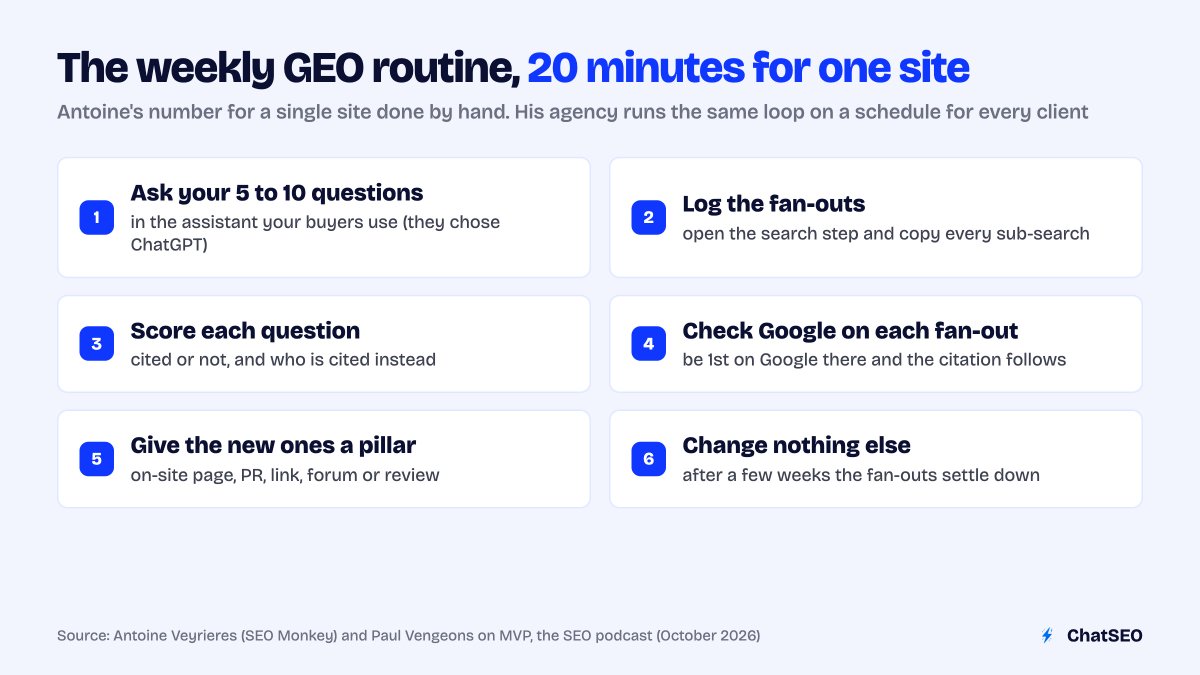
4. Pull the fan-outs once a week, by hand or with a small tool you build yourself. 20 minutes for one site
5. Every fan-out gets a pillar: a page on your site, or a place on someone else’s (PR, links, forums, reviews)
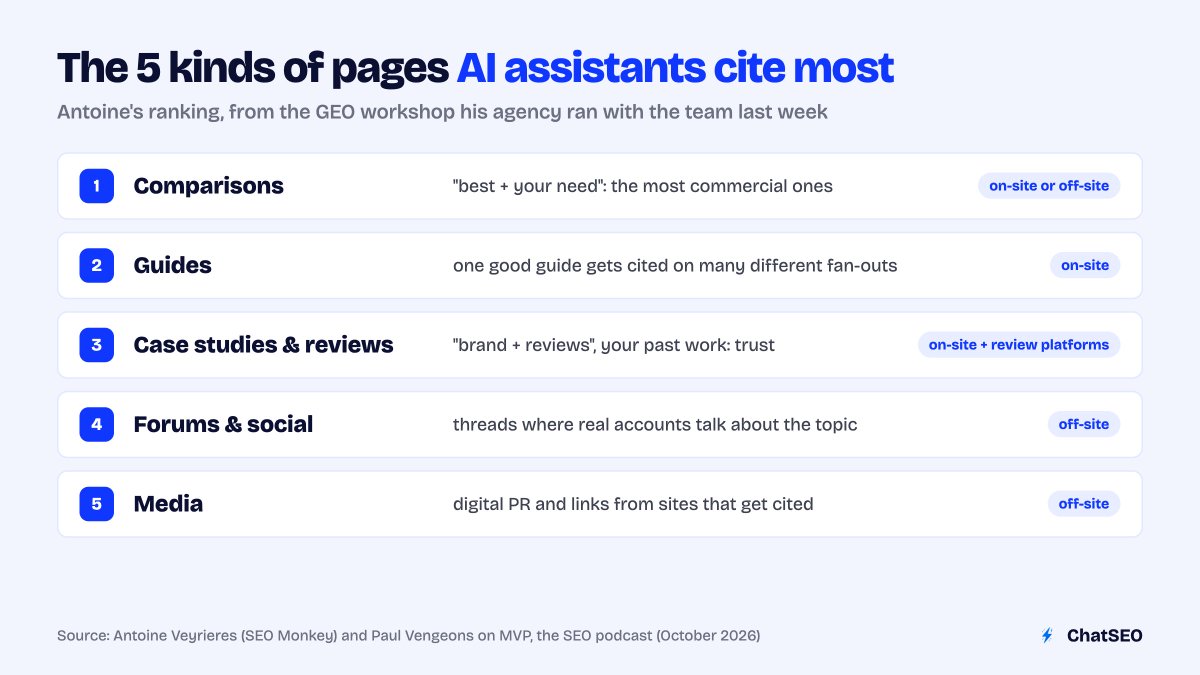
6. The 5 kinds of pages AIs cite most: comparisons, guides, case studies and reviews, forums, media
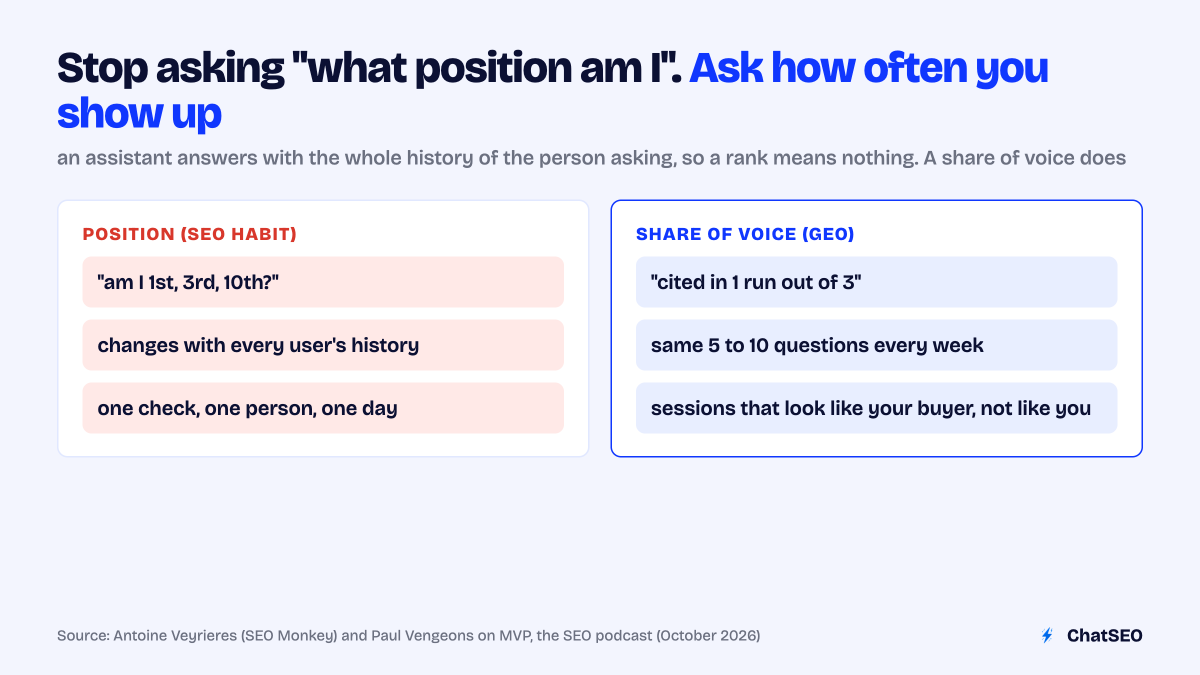
7. Track a share of voice, not a position. An AI answers with the whole history of the person asking
8. Putting yourself first in your own ranking worked for a while. It doesn’t anymore
9. Give the AIs one identity: same name, address, phone and listings everywhere
10. Be 1st on Google on each fan-out, and the citation follows. Everything else is classic SEO
I’m giving every step and all 10 prompts away for free ✅
This week on MVP, the French SEO podcast I host with Antoine Veyrieres, we did something we rarely do: no guest, just the two of us, and one subject. GEO, the way we actually run it today
Antoine runs SEO Monkey, an SEO agency with more than 400 clients across France. He sees every kind of site, every kind of niche, and every kind of client who walks in asking for “GEO” because they read about it on LinkedIn
The week before we recorded, his agency ran an internal workshop to update its GEO process. One of his team wrote the new standard operating procedure. Antoine brought it to the episode and read it to me, line by line
So this is that process. The agency version, and the version you can run alone on one site with zero budget. Plus my own side of it: what I do differently, what I stopped doing, and the one GEO habit I had for years without knowing it was GEO
We said it on the episode and I’ll say it again here: we already made several GEO videos. Our practices keep moving. This one is the most up to date, with what works now and the mistakes you should not make
The episode is in French. The link is at the end
Last thing: if you want more of these, a like, a quote or a bookmark is what keeps them coming 🙏
Little tip: bookmark this. You’ll come back to it
GEO is SEO with one extra map
Let me start with the sentence that will save you the most money
Antoine said it at the end of the episode, and it’s what he tells every client who asks: SEO and GEO are the same thing. When a client walks in saying “I want GEO”, he says cool, let’s do GEO, it’s called SEO. When a client walks in saying “I want SEO”, he says yes, and you’ll get GEO with it
That’s not a slogan. It’s how the assistants work
When ChatGPT, Claude, Gemini or Perplexity doesn’t know the answer, it searches. It types queries into a search engine, reads what ranks, and quotes it. Google said it itself in its own guide to AI features: the AI answers run on the classic index, through query fan-out
So if you have no SEO, the model has nothing to find. That’s why I never sell GEO as a separate discipline you start after SEO. It sits on top of SEO. Rank first, and the citations come
But there IS one difference, and that’s the whole subject of this article
In classic SEO, you have a target keyword. You rank for it. Job done
In GEO, your target is a question. And behind that question, the AI runs a whole set of searches you never see. You don’t rank for the question. You rank for what the AI searches
-> GEO is not a new discipline. It’s SEO on keywords you didn’t know you had
What a fan-out is (and why it’s your real keyword)
Antoine’s first point, and the one his whole process is built on: map your fan-outs
A fan-out is a sub-search. When you type a question into ChatGPT, it doesn’t search for your question. It breaks it into several smaller searches, runs them, reads the results, and builds its answer from them
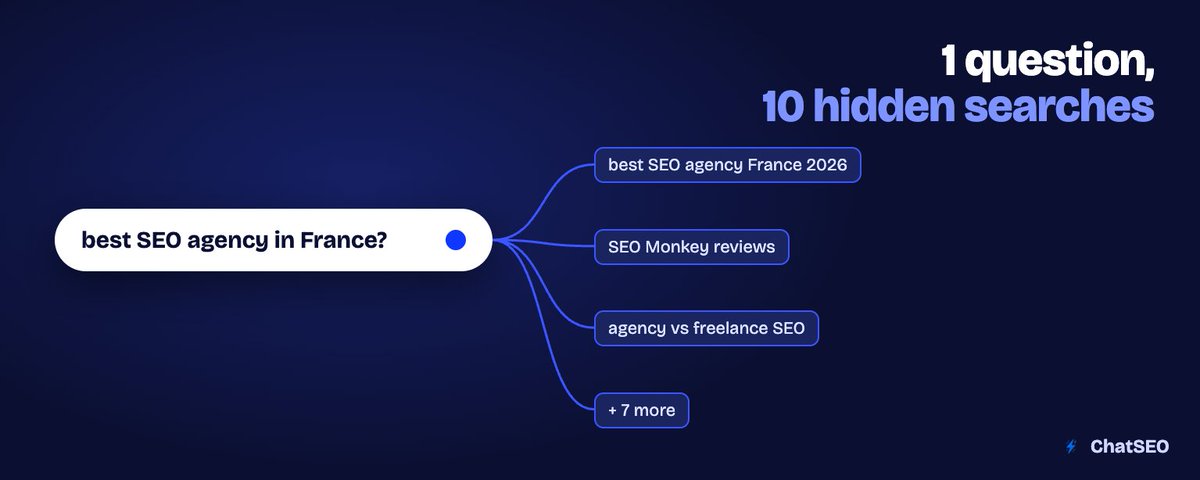
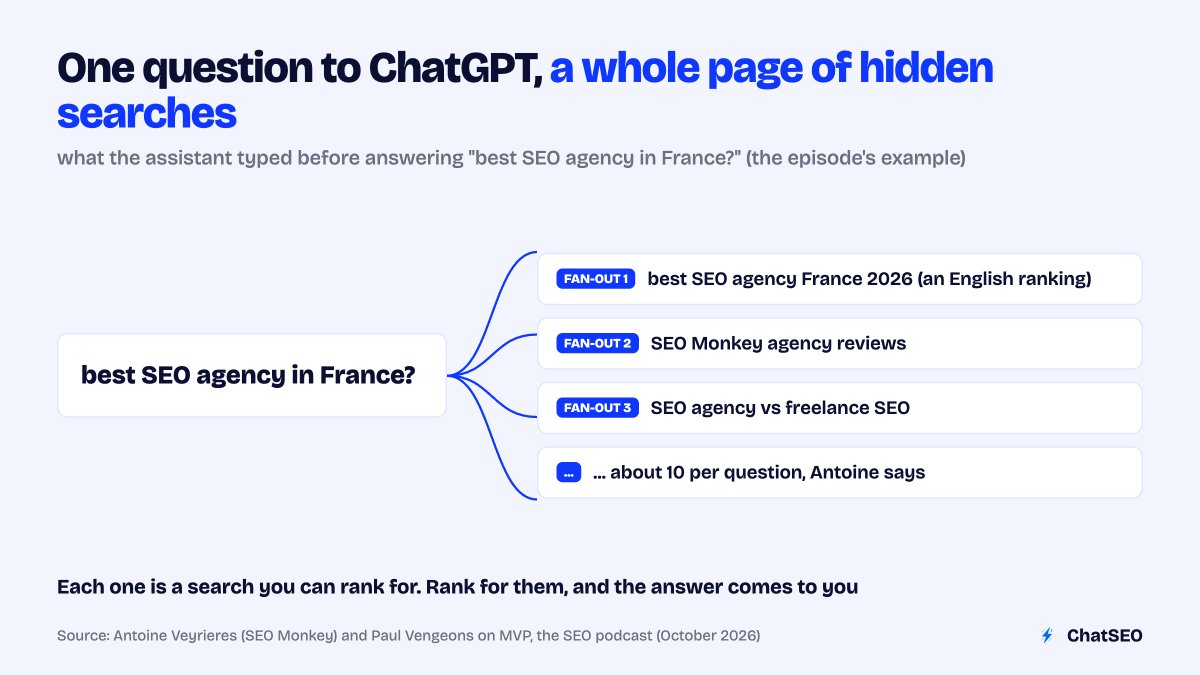
He gave the example from his own world. Someone asks ChatGPT: “what is the best SEO agency in France?”
Here’s the kind of thing the assistant actually searches before answering:
“best SEO agency France 2026”, in English. It goes and reads an English-language ranking, even for a French question
“SEO Monkey agency reviews”. It decided to check the reviews of two or three agencies, so it searched for them by name
“SEO agency vs freelance SEO”. It wants to compare the two options before recommending one
Each of those is a fan-out. Each of those is a search with a results page. And each of those results pages is something you can rank on, or get yourself mentioned on
Antoine’s point is that the scraping goes further than what you’d expect. The model also pulls results you could never rank on yourself, like Wikipedia-type pages, because it wants authority sources. You won’t beat Wikipedia. But you can work every fan-out where a normal page has a chance
And here’s the part that makes it a process instead of a one-off: the fan-outs change. From one month to the next, the same question can trigger different searches. So you pull them regularly, not once
-> The question is the goal. The fan-outs are the keywords. You rank on the keywords
Step 1: pick 5 to 10 target questions. Never 200
This is the rule I liked most, and it’s the one most people break
Antoine’s agency caps every client at 5 to 10 target questions. Maximum. Above that, he says, it becomes completely unmanageable as an objective
At first that sounds tiny. In SEO you’d track hundreds of keywords. But think about what one question really is: each one breaks into about 10 fan-outs. So 10 questions is already around 100 searches to work on. That’s a lot of work for one site
I asked him for a random business to test it live. He picked a carpenter, the kind who builds custom beds
What questions does a carpenter really need to show up on? “Who is the best carpenter in my city?” “How much does a custom bed cost?” Maybe one more about his specialty. That’s it. Very few. And that’s true of almost every business
For his own agency it’s “what is the best SEO agency”, “what is the best GEO agency”, and a couple of long-tail ones. For me with ChatSEO, it’s questions like “what is the best SEO tool”. Very fast, very efficient
It’s the 20/80 applied to GEO. In classic SEO you still worked plenty of long-tail keywords. In GEO, one question already hides the long tail inside its fan-outs, so you need fewer questions, not more
My own version is even smaller: on my own sites, I track 3 to 5 real prompts by hand. The ones a real buyer would type. Not the 300 synthetic prompts a tracking tool invents to fill a dashboard
Here’s the prompt I’d use to pick them:
You are my GEO strategist. My business: [WHAT I SELL, TO WHOM, WHERE]

List the questions a real buyer would type into ChatGPT or Claude right before choosing a provider like me. Only questions with buying intent:
- "best [service/product] for [need]" and "best [service] in [city]"
- price questions ("how much does [service] cost")
- comparisons ("[option A] vs [option B]", "[competitor] alternative")
- review questions ("[competitor] reviews")

Rules:
- Write them the way a person types them, not like keywords
- No informational questions ("what is [topic]")
- Rank them by how close the person is to paying
- Give me 15, then tell me which 5 to 10 you would keep and why
- Do not invent search volumes. If you don't know, say so
-> Ten questions is not a small target. It’s around a hundred searches. Choose them like they cost money
Step 2: pull the fan-outs (by hand, for free)
Now you need to see what the AI actually searches for each question
The free way, which is how Antoine says anyone can do it: go to any assistant, type your target question, and watch the small bubble that appears while it searches. Click it. You can read the path it took: what it searched, which pages it opened
In ChatGPT, Claude and the others, that search step is visible right in the conversation. Copy every sub-search. That’s your list of fan-outs for that question
Then you decline it into a roadmap. One line per fan-out, under its question
A few things I’d add from my own testing:
Use the assistant your buyers use. Antoine’s agency uses Claude for its own work, but runs the analysis on ChatGPT, because more people use ChatGPT. Track where your buyers are, not where you are
Use a clean session. Your own history colors the answer. More on that in the share of voice section
Run each question more than once. The same question doesn’t always trigger the same searches. What comes back every time is what matters
There’s also a source most people ignore, and it’s free: the AI Performance report in Bing Webmaster Tools. It shows when your site is cited in Microsoft’s AI answers, and the grounding queries the AI actually typed to find you. That’s real fan-out data, from the engine itself. I trust it more than any score a third-party tool sells
Here’s the prompt to clean what you copied into a usable list:
Here is what an AI assistant searched before answering the question "[TARGET QUESTION]". I copied it from the search step, across [N] runs:

[PASTE EVERY SUB-SEARCH, ONE PER LINE, WITH THE RUN NUMBER]

Do this:
1. Merge the duplicates and near-duplicates (same intent, different words)
2. For each fan-out, count in how many runs it appeared
3. Sort by that count, most frequent first
4. Next to each, write the intent: comparison, review, price, ranking/list, guide, or other
5. Flag the fan-outs in another language than the question
6. Do not add any fan-out I did not paste
-> The search step is printed on the screen. Most people never click it
How to read a fan-out list (the 4 patterns)
The first time you copy the searches out of the search step, the list looks like noise. After a few questions, you start seeing the same four shapes come back. Each one tells you something different about what to build
1. The language switch. Antoine’s example had it: a French question, and the assistant goes and reads an English ranking. It happens a lot on “best” questions, because the English web has more lists. If your market is French and the fan-out is in English, you have two options: get into the English lists that already rank, or make sure the French version of that page exists and is better. Don’t ignore it because “my clients don’t speak English”. The model does
2. The brand check. “[brand] reviews”, “[brand] opinions”, “[brand] scam”. The assistant has already shortlisted a few names and goes to verify them. If yours is in that search, congratulations, you’re on the shortlist. Now the question is what it reads when it checks you. That’s the reviews and identity work from Step 9
3. The comparison. “[option A] vs [option B]”, “agency vs freelance”, “[tool] alternative”. The assistant is building a table in its head. The page it reads is usually a comparison that already ranks. That’s comparison content, type 1 from the list above, on your site when you can be honest about it, on other sites otherwise
4. The freshness signal. A year in the search (“2026”), “latest”, “updated”. The assistant wants recent sources. A page with an old date, or no date at all, loses this one even if it’s better. Put the date on the page, update it for real, and put the year in the title when the page really is current
When a fan-out doesn’t fit any of these, it’s usually a definition or a how-to. Those are guide territory. One good guide catches many of them at once
-> Four shapes come back on almost every question. Once you see them, the roadmap writes itself
Step 3: do it every week (20 minutes for one site)
Fan-outs move. That’s why Antoine runs this weekly
His agency has an internal tool for it. They call it LLM Tracker. It’s not for sale, it’s a business tool built for their own clients. What it does is simple to describe: for each client it holds the 10 target questions, and every week a small robot goes to ChatGPT, types the 10 questions, updates the fan-outs, and gives a score of how often the client appears
The score reads like this: “you appear one time out of three on ‘what is the best SEO agency in France’”. And it breaks that down on every fan-out too. Then the editorial plan follows from it
But he was very clear on the episode: you don’t need the tool. They built it because they manage a lot of projects. For one site, his number is this: once a week, take 20 minutes, run your 10 target questions, update your fan-outs, update your scores, and adjust your editorial plan
And the reassuring part: after a few weeks, the fan-outs settle. It’s the same ones that keep coming back. The weekly check becomes fast because most of it doesn’t change
Here’s a prompt that turns your weekly notes into the scorecard:
You are my GEO tracker. Here are this week's runs for my site [DOMAIN].

For each target question, I ran it [N] times in [ASSISTANT] from a clean session. For each run I noted: was my site cited (yes/no), which sites were cited, and the sub-searches shown.

[PASTE THE RAW NOTES]

Here is last week's scorecard:
[PASTE IT, OR "none"]

Give me:
1. A table: question, times cited / runs, change vs last week
2. The fan-outs that are NEW this week, and the ones that disappeared
3. The sites cited most often instead of me, with how many times
4. The 3 actions for this week, ranked by how many questions they help
Keep every number exactly as in my notes. Do not estimate anything I did not count
-> Twenty minutes, once a week, on the same 10 questions. That’s the whole tracking budget
Why I would never start with a paid GEO tracker
On the episode I gave my ranking of the three ways to track this, and I’ll give it to you the same way
For someone who is starting, with not much budget, who wants to do it well: the worst option is paying for an external tracking tool. It’s expensive, and in my opinion those tools have biases. They test prompts nobody really types, then sell you a visibility score built on them
The two options I like:
By hand: the 20 minutes a week above. Free, and you see the real answers with your own eyes
A small internal tool: if it’s something you need regularly, build it yourself with Claude. It doesn’t take long anymore
And if you have a real budget, several employees, cash in the bank: sure, look at the external tools, there are several (Profound is the best known). If their only product is doing this, you should expect it to be more precise than what you’ll build in an afternoon. That’s logical
But for small sites, and honestly even for good-sized companies, build your own process. You’ll save money
This is also why ChatSEO doesn’t sell a visibility score. On purpose. The real data is free, and the rest is a score on prompts nobody typed
-> A visibility score on invented prompts is a nice chart. Ten real questions a week is a strategy
Build your own tracker with Opus 5.5 (an afternoon)
Here’s where the title comes from
On the episode I went on a little tangent, because I was genuinely shocked that week. I test my AI processes on different models all the time. I had a long period on Claude (Opus 4.5, 4.6, 5), then the ChatGPT Astra hype, so I tested that. Astra is strong, but the models below it weren’t great for me
Then I came back to Claude and now I do everything with Opus. And right now, Opus takes control of my computer and does things for me. Not with a special product. It just drives my machine with Python. It browses websites. It fills in forms. Things where I used to have to check every step, it now does fast, and right the first time
So when Antoine described his weekly robot, my reaction was: anyone can build this now. If tracking your questions is something you’ll do every week, have Opus build you the small tool. I haven’t built mine yet. But if I wanted to follow this seriously, that’s exactly what I’d do
Here’s the brief I’d give it. Adapt it: what’s possible depends on the assistant you track and what its own terms allow
Build me a small weekly GEO tracker for my site [DOMAIN]. Keep it simple: one script, one CSV, nothing to host.

Input: a file questions.txt with my 5 to 10 target questions

Each week, for each question, [N] times:
- Ask it to [ASSISTANT], with web search on, through its official API, from a clean context (no memory, no history)
- Save: the date, the question, the run number, whether [DOMAIN] or my brand "[BRAND]" is cited, every cited URL, and every search the assistant ran if the API returns them

Output:
- results.csv, appended each week (never overwritten)
- a short weekly.md: share of voice per question (cited runs / total runs), change vs last week, new and lost fan-outs, top 5 domains cited instead of me

Rules:
- Before writing code, tell me what the API really returns about searches and citations, and what it does not
- Never fake a field the API does not return: leave it empty and say so
- Add a dry-run mode that costs nothing, and print the cost of a real run before it starts
-> The tool Antoine’s agency built is now an afternoon with a good model. The method is what matters, not the software
Step 4: give every fan-out a pillar
This is where GEO stops looking like SEO on paper, and it’s Antoine’s most useful change
In a classic semantic roadmap, every line is a page you write on your own site. In his GEO roadmap, every fan-out gets a “pillar” column, and the pillar can be anything SEO already knows how to do: content on your site, technical, links, digital PR, forums, reviews
His two examples:
The question is “what is the best SEO agency”. One fan-out is “SEO agency ranking 2025”. A ranking is not something you publish about yourself. So that fan-out goes to the off-site pillar: digital PR or link building, to get into the rankings that already exist
Another fan-out is “case study + client name + brand name”. That one makes total sense on your own site. You publish the case study of a client who uses your service. So it goes on-site
And the 20/80 doesn’t change: most of the work is still semantic content on your site, plus off-site semantics, meaning links and PR. Antoine’s rule of thumb: when a fan-out can be won on your own site, don’t overthink it, win it on your site. On-site is so fast and so effective when it’s done well
So the roadmap is one question, about ten fan-outs, and for each one an operational choice: create content on your site, digital PR, a forum, social media, links
Here’s the prompt that builds it:
You are my GEO roadmap planner. Site: [DOMAIN]. Business: [ONE LINE]

Target question: "[QUESTION]"
Its fan-outs (from my tracking, most frequent first):
[PASTE THE LIST]

For each fan-out, give one line:
- The fan-out
- The pillar: ON-SITE (a page on my site) or OFF-SITE (PR, link, forum, review platform, social)
- Why: what kind of page ranks on it today, and whether a page of mine could realistically be one of them
- The exact action: which page to create or update on my site, or which kind of third-party site to get on
- Effort: S, M or L

Rules:
- If a fan-out is a ranking or a "best" list, never propose that I publish my own list with me first. Propose getting into other people's lists
- If it's a review query, point to the review platforms, not to a page I write about myself
- Prefer ON-SITE when a normal page can win it
-> One extra column turns an SEO roadmap into a GEO roadmap. Nothing else changes
I asked Antoine which fan-outs come back the most across his 400+ clients. Which kinds of pages get scraped and quoted
He gave me a ranked list. Here it is, in his order
1. Comparisons. The “best + my need” queries. Not “SEO agency” anymore, but “best SEO agency for X”, “best product for this need”. These are the most commercial ones, so they come first
2. Guides. Informational content comes back a lot, through guides. A guide gets cited on a lot of different fan-outs, because it covers many semantic branches. A sales page is cited on its one target query. A great guide, published regularly, is very well scraped by the AIs. That’s exactly why you’re reading one
3. Case studies and reviews. Everything around “reviews + brand” and your past work. It reinforces your authority. It’s your reputation, read by a machine
4. Forums and social networks. Every site where different user accounts interact on the subject of the fan-out. Reddit-style threads, discussions, comments
5. Media. Everything linked to digital PR and link building
So, his summary: 5 to 10 global questions maximum, and 5 kinds of content you can do on your site or off it
My only addition, from my own GEO doctrine: AIs quote passages, not pages. A direct answer in the first lines, a numbered list, a table of facts someone can check. If your comparison page buries the answer in paragraph eight, the model takes someone else’s
-> Comparisons, guides, reviews, forums, media. If a fan-out doesn’t fit one of the five, it probably isn’t worth your week
Step 5: write pages that answer every branch
Antoine had the SOP in front of him and read me what it says about content, whether it’s on your site or on someone else’s
The rule: map the demand, and cover the maximum of questions a buyer can ask, on each page
He described it as a tree of branches. For a buyer, there are:
The objections: “it’s too expensive”, “I can do it myself”
The doubts: “does it really work for a business like mine?”
The fears: “what if it breaks something?”, “what if I’m locked in?”
The why: why use this at all, why now
The sources: where the claims come from
The dates: when it was true, when it was updated
The point is to have content with a lot of internal structure, silos inside your own page, so it can be picked up by the maximum number of fan-outs. One page, many branches, many chances to be the passage the AI quotes
This is not keyword stuffing. Each branch is a real question a real buyer asks before paying. If you answer them all, the human stays and the model has something to quote
Here’s the prompt I’d use before writing or updating a page:
You are my content strategist for GEO. Page: [URL or "new page"]. Main question it must win: "[QUESTION]"

Fan-outs this page should also answer:
[PASTE THE ON-SITE FAN-OUTS FROM THE ROADMAP]

1. List every question a buyer asks before choosing, grouped by branch: objections, doubts, fears, why (use it / now), proof and sources, dates and updates
2. For each, say if the current page answers it: yes, partly, no (quote the passage if yes)
3. For each "no" or "partly", write the answer as a self-contained passage of 40 to 80 words: the answer first, then the fact or the source behind it
4. Propose the section order: the direct answer at the top, then the branches in the order a buyer worries about them
5. Mark every claim that needs a real number or a real example I must provide. Never invent one
-> One page, every branch. The AI quotes the passage that answers, not the page that ranks
Step 6: never put yourself first in your own ranking
On the episode I did the recap of what really differed between GEO and pure SEO since the beginning. It’s a short list
First difference: targeting GEO keywords. The “best X” queries. Those weren’t keywords most of us targeted in SEO before. Affiliate sites always did (“best cordless drill”), but service businesses mostly didn’t. That one stayed. It still matters
Second difference: putting yourself first in your own rankings. You publish “the 10 best [your category]”, you put yourself number one, ChatGPT reads it and repeats it. That worked for a while. It doesn’t work anymore. So that one is gone
I taught that tactic myself, in videos, until the middle of 2026. I stopped, and I had Claude remove the self-rankings from my own sites. The assistants caught on: they now tend to cite the second and third of a list rather than the author who put himself first
So the only thing left is the first one, done differently: you target the GEO keywords, but you don’t really target them with your own site. You target them with OTHER sites that put you first in THEIR rankings, if possible
That’s honestly all you have to remember. That’s GEO. Everything else is classic SEO
What it means in practice:
Get into other people’s lists. The “best X” articles that already rank and already get cited. That’s the off-site pillar from Step 4
If you publish a list yourself, rank by truth. Put the real leaders in. Say who each one is for. If you include yourself, disclose it, and don’t take first place. A list where you’re first and everyone else is bad convinces nobody
Sell yourself on the pages made for it: “[your brand] vs [competitor]” and “[competitor] alternative” pages are where your own site can honestly win
-> The trick that worked was being first in your own list. What works now is being first in someone else’s
Step 7: track a share of voice, not a position
Antoine had a slide on how to measure visibility, and it’s the part that changes the most habits
In SEO, you track a position. Am I 1st, 2nd, 10th, 20th?
In GEO, that doesn’t make sense. An AI doesn’t only have your question. It has the whole history of the person asking. It knows if they live in France, in Paris, in Lille, what they asked last week, what they need. So a position means nothing: the same question gives a different answer to every person
What you track instead is a share of voice: your percentage of appearance across many simulated searches. “Cited in one run out of three”, not “ranked 3rd”
And here’s the subtle part. His agency gives its tracking sessions a history, so the simulated searchers look like the client’s real buyers. He calls it building the persona
His example: you sell dog grooming. Your buyers are a bit of everyone, but on average maybe a bit older, with more budget. The little grandma who takes her poodle to the groomer. Your tracking has to run as people who look like her, not like you
Because if only people like me run the searches, the results will all look the same. Me, and probably everyone who listens to our podcast, will get very similar answers. Run the same search on your mother’s phone, or your grandmother’s, and you may see something different. Especially on broader questions than “best SEO tool 2026”, which is ultra-niche
At agency scale they build that into a global knowledge base for the tracking. On your own, you can do a lighter version:
You are helping me track my share of voice in AI answers, for my site [DOMAIN].

My real buyer: [AGE RANGE, CITY OR COUNTRY, JOB OR SITUATION, BUDGET, WHAT THEY USUALLY ASK]

1. Write 3 short "buyer profiles" that match this person. For each: 3 or 4 everyday questions they would plausibly have asked an assistant in the past weeks, unrelated to my business
2. Write how each profile would phrase my target question "[QUESTION]" in their own words
3. Tell me how to run each profile in a clean session: open a new chat with no memory, ask the 3 or 4 everyday questions first, then the target question in their words
4. Give me the table to fill: profile, run, cited yes/no, who was cited, sub-searches shown
5. Remind me that this is a share of voice: the result is "cited X times out of Y runs", never a rank
-> You don’t rank in an AI answer. You show up, or you don’t, a certain share of the time
Step 8: audit the sources that get cited
The next point on Antoine’s slide: the cited sources
For each target question, his tracking keeps a ranking of the domains that get cited, site by site. Over the weeks you see a history: to appear on “best SEO tools in 2026”, it’s always the same few sites the AI reads
Sometimes it’s a small site. A little digital media cited three times on that question. That’s gold: it becomes a site to contact, for digital PR or a link, so you appear on that fan-out
His comparison is the one that made it click for me. In link building, you look at the link profile of whoever is first on the Google results page, and you know what you need. It’s the same for an AI results page. If every time someone asks “best SEO agency in France”, the same source comes back first in the citations, you absolutely have to get in touch with it. Create your page there, get mentioned, build the relationship
There’s a notion of authority. But there’s also a notion of trust. You audit the answers and you notice: this small site gets cited a lot. Interesting. Go there
Using ChatSEO, for my site [DOMAIN]:

Here are the domains cited in AI answers to my target questions over the last [N] weeks, with how many times each was cited:
[PASTE: question, domain, times cited]

1. Group them by type: media, list/ranking article, review platform, forum, competitor, other
2. For each domain cited 2+ times, read the live Google results for the fan-outs where it appears and tell me if it also ranks there, and on which page
3. Find the exact page that gets cited, and whether my brand is mentioned on it
4. Rank the outreach targets: most cited first, then the easiest to get on (lists that accept additions, review platforms, threads that allow comments)
5. For the top 5, write the angle: why their reader would want my brand on that page. No generic pitch
-> Look at who the AI reads, the way you’d look at the link profile of the #1. Then go be on that page
The last item on the slide was NAP consistency, which Antoine rephrased better: give the AIs one single identity
The idea is trust. You want the maximum of brand mentions, brand citations, on your site and on other sites, all telling the same story. Concretely:
Your name, address and phone the same everywhere, on your site and in every listing
Links from your site to your social accounts, and the social accounts actually existing and alive
A legal notice page, the boring one, because it states who you are
Your listings: Google Maps, Trustpilot, the review sites of your industry
Mentions of your brand on other sites, linked or not
All of that is taken into account, fully, in GEO. An assistant that has to recommend a business wants to be sure the business is real and is what it says it is
You are my brand consistency auditor. Brand: [BRAND]. Site: [DOMAIN]. Official name, address, phone: [EXACT NAP]

1. List every place my brand appears that I give you below, and check that the name, address, phone and description match the official ones exactly:
[PASTE: my site footer and legal notice, Google Business Profile, Trustpilot, social bios, directory listings]
2. Flag every mismatch, even small (abbreviations, old address, old phone, different category)
3. Check that my site links to each social account, and that each account links back
4. List the review platforms of my industry where I have no listing yet
5. Give me the fix list in order: biggest trust gap first
-> An AI recommends a business it can verify. Make yourself easy to verify
Step 10: check your Google position on every fan-out
This is the step that closes the loop, and it’s the last sentence of Antoine’s summary: for each fan-out, you track your position on Google
Why Google, when the target is ChatGPT? Because the assistant searches, and it reads what ranks. For ChatGPT, Claude and the others, the search runs on a classic engine. If you’re on page 3 for a fan-out, the model will almost never read you on it. If you’re 1st, the odds flip
So every fan-out on your roadmap gets two numbers next to it, every week:
Your share of voice on the question it belongs to (Step 7)
Your Google position on the fan-out itself
When the Google position goes up and the share of voice follows a few weeks later, you know the plan works. When the share of voice is stuck while you’re already 1st on Google, look off-site: the AI is reading someone else’s list, someone else’s review page, someone else’s forum thread. That’s Step 8
Here’s the prompt I’d run for that column:
Using ChatSEO, for my site [DOMAIN]:

Here are the fan-outs from my GEO roadmap, grouped by target question:
[PASTE THE ROADMAP: question, fan-out, pillar]

For each fan-out:
1. Read the live Google results in [COUNTRY], [LANGUAGE]
2. Give my best ranking URL and its position, or "not in top 20"
3. Give the top 3 URLs and what kind of page each one is (list, guide, review, forum, media, competitor page)
4. If the pillar is ON-SITE: tell me which of my pages should rank there, and the one change most likely to move it up
5. If the pillar is OFF-SITE: tell me which of the top 3 pages I should try to be mentioned on
Never estimate a position: if you can't read it live, say so
-> The AI cites what ranks. Your Google position on each fan-out is the leading indicator of your share of voice
The architect, the three accesses and the three bottles of wine
Right after the sponsor break, I told a story on the episode that has everything in it: local, Claude, ChatSEO, and a developer who probably hates me now
My landlord here in Budapest is Hungarian. Every time he comes to collect the rent, we talk business for 10 or 20 minutes. Every time, I show him how ChatSEO is growing. So he understood that it works, and that I do SEO. Around the third or fourth visit, he asked me: honestly, what would you do with my site?
He’s an architect. He designs custom projects, beautiful houses. His site was the kind Antoine knows well: four pages max, pure branding, nothing that targets a search
So I put his site into ChatSEO. We saw interesting things. And I wired everything with the ChatSEO MCP and Claude, on his site
To change everything, I needed three accesses. His blog ran on a CMS (I believe it was Sanity). His Cloudflare, for the HTTP to HTTPS redirects. And his GitHub, because the rest of the site was static
The developer gave me access each time, but never the real one. Editor rights, not admin. Each time I had to push to get the actual access. And once I had it, everything was integrated in two seconds
I did it all in one afternoon. Pages on real Hungarian business keywords. His Google Business Profile, created and already validated
And here’s the detail I told Antoine about. When I created the listing, I put a keyword straight into the name: his company name plus something like “architect Budapest”. I brainstormed it with Claude first: put the normal name and edit it later, or put the keyword directly? Its answer was that the chances of acceptance were higher if I put it directly, because a later edit can trigger a review. So I did. And it went through
Honest note, because I don’t want you to copy the risky part blindly: Google’s rules say the listing name should be the real business name, and keyword stuffing in names can get a listing suspended. I took the risk because his listing didn’t exist before. There was nothing to lose. On a listing with years of reviews, I wouldn’t
That same evening, my landlord came back. He had wanted to pay me at first. I told him no, I’m focused on ChatSEO, I don’t take client work anymore, but the 20/80 for him I can do fast. So he brought me three bottles of good wine
-> One afternoon, three accesses, a site that finally targets searches. The hardest part was getting the admin rights
The GEO habit I had for years without knowing it
Funny fact I realized live on the episode
For fun, I relaunched an affiliate site. It takes me almost no time, because Opus 5.5 does the work while I do other things. I can tell it “take every page of my site, add CTAs, fix this”, go do something else, barely check, and know it’s done right the first time
And a lead came in from ChatGPT. On a site where I never did any GEO
Then I remembered: I have a habit. Whenever I can, I put “best” in the title. Even if the keyword is “cheap cordless drill”, the title becomes something like “Cheap cordless drill: the best one to buy”. Once the main keyword is placed, adding “best” costs nothing, and it potentially adds a lot of GEO queries
That’s exactly the first difference from Step 6: the “best X” queries. I’d been targeting them by reflex for years
My own rule on titles, for both Google and AI: the title is the strongest on-page element you have. Put the main keyword first, then the words that catch the evaluation queries: “best”, the year, “price”, “review”, “alternative”. The year in the title is a cheat code
Using ChatSEO, for my site [DOMAIN]:

Take my pages that target a commercial query (product, service, comparison, category). For each:
1. The current title, and the main query the page gets clicks for in Search Console
2. A new title: the main query first, then the evaluation words that fit honestly ("best", the year, "price", "review", "vs", "alternative"), under 60 characters
3. Only propose "best" or a year if the page really compares options or is really up to date
4. Never change a page that already ranks in the top 3 for its main query: list those separately
5. Give me the old and new title side by side, and the query each one now covers
-> “Best” in the title was GEO before anyone called it GEO
What clients actually ask for
I wanted Antoine’s read on the market, because he talks to more clients than I do
His answer was honest, and a bit old school, in the good sense. He’s been doing SEO for years. He refuses to oversell GEO as “invest massively, it’s do or die”. When people ask for GEO, he does GEO, which is SEO. When people ask for SEO, he tells them they’ll need GEO too, and it’s the same work
What changed is the demand. Everyone is alert on the subject. Everyone understands that more and more traffic comes from the AIs. So demand keeps rising
But for him it isn’t a new demand. People have a budget to get traffic. Sometimes they call it GEO, sometimes SEO, sometimes ads. And to rank in the AIs you do what the web always required: create content, develop sites, get other sites to talk about you. A good SEO trained for years will be good at GEO. It’s not a different job
He also gave a business idea for the agencies and freelancers reading: if you were more sales-driven, you could build a small database and run GEO workshops, or small events exclusively on GEO. It’s a way to get leads, because everyone wants to understand it right now
-> The demand is new. The work isn’t. Sell it honestly and you keep the client after the hype
The whole process on one small business (the carpenter)
Let me put every step together on Antoine’s random example, so you can see what a week of this really looks like. Everything below is a worked example, not a client. Your numbers will be your own
The business. A carpenter in one city who builds custom beds and furniture. Small site, five pages, no blog
Step 1, the questions. Three are enough: “best carpenter in [city]”, “how much does a custom bed cost”, “custom furniture or flat pack, which is better”. That’s it. Three questions, roughly thirty searches behind them
Step 2, the fan-outs. He asks each question three times and copies the searches. He’ll typically see a local list (“best carpenters [city]”), a price search (“custom bed price per square meter”), a review check on two or three names, a comparison (“custom bed vs IKEA bed”), maybe a forum thread
Step 3, the habit. Every Monday, 20 minutes. After a month, most of the fan-outs stop changing
Step 4, the pillars. The price search is on-site: a real price page, with ranges and what drives the cost. The local list is off-site: the existing “best carpenters in [city]” articles, the local directories. The comparison is on-site: an honest “custom vs flat pack” page that says when flat pack is the better choice
Step 5, the branches. The price page answers the fears (“what if it doesn’t fit my room”), the doubts (“how long does it take”), the why (“why not buy one”), with dates and real photos
Step 6, no self-ranking. He doesn’t write “the 10 best carpenters in [city]” with himself first. He asks the local site that already wrote one to have a look at his work
Step 7, share of voice. He runs his three questions as a buyer who looks like his real clients, from a clean session. He notes “cited 1 out of 3” or “not cited”
Step 8, the sources. He notices the same local blog cited on two of his three questions. That’s his first email
Step 9, identity. Same name, address and phone on his site, his Google Business Profile, his directory listings. Photos on the listing. Reviews asked for after each delivery
Step 10, Google. He checks his position on the price search and the comparison every week. When those go up, the citations follow
That’s a complete GEO plan for a five-page site. No tracker, no budget, a few pages and a few emails
-> Small business, small plan. GEO doesn’t need scale, it needs the right ten questions
The 9 mistakes that kill a GEO plan
Tracking 200 prompts. Past 10 questions it’s unmanageable, and a tool’s synthetic prompts aren’t what buyers type
Paying for a tracker before you’ve done it by hand once. You won’t know what the score means
Working the question instead of the fan-outs. You can’t rank for a question. You rank for what the AI searches
Checking once. Fan-outs move from month to month. Weekly until they settle
Ranking yourself first in your own list. It used to work. Now it gets you skipped
Tracking a position. Every answer depends on the person asking. Track how often you appear
Ignoring the fan-outs in another language. The assistant reads English lists for French questions. If you’re not on them, a competitor is
Never looking at who gets cited. The small site quoted three times on your question is the cheapest win you have, and most people never open the sources
Treating GEO as separate from SEO. No rankings on Google, nothing for the AI to find. Roughly one action in ten is GEO. The other nine are SEO
What this does not prove
I want to be straight about the limits
The 400+ clients are Antoine’s agency. The process comes from his team’s workshop and SOP. It’s how a serious agency runs it today, not a law of nature, and not a promise of results
The fan-out example is an example. “Best SEO agency in France” is the one Antoine described. Your question will trigger different searches, and they can change from one week to the next
Share of voice is a sample. “Cited one time out of three” depends on how many runs you did and how close your sessions are to real buyers. Ten runs is an indication, not a measurement
My landlord’s site is one site. One afternoon, real pages, a validated listing. I’m not claiming rankings or revenue for him here, because I don’t have them to show you
The affiliate lead from ChatGPT is one lead. It’s an anecdote that made me notice my “best” habit. It’s not a growth curve
Internal tools have limits. What your tracker can see depends on what the assistant’s API returns. Don’t fill a column with guesses
Nothing here is a guarantee. GEO results follow SEO results, and SEO is a probability, never a promise
What I would do this week
Monday: run the first prompt. Keep 5 to 10 target questions, no more
Monday: ask each question 3 times in the assistant your buyers use. Click the search step. Copy every fan-out
Tuesday: clean the list with the second prompt. Keep the fan-outs that come back
Tuesday: open Bing Webmaster Tools and look at the AI Performance report. Note the grounding queries
Wednesday: build the roadmap. One line per fan-out, a pillar for each: on-site or off-site
Wednesday: check your Google position on each on-site fan-out. That’s your real gap
Thursday: update the one page that can win the most fan-outs. Answer every branch
Thursday: list the 5 domains the AI cites most. Write to the first one
Friday: fix your identity: same name, address, phone, listings and social links everywhere
Every week: 20 minutes. Same questions, new fan-outs, the score. Then the work
The real lesson
Antoine summed it up at the end, and I’ll keep his words because I can’t do better
If you remember one thing, the 20/80 is this notion of having very few target questions. If you want to do GEO tomorrow on your brand, you have between 5 and 10 GEO questions, max. You take each one. You go to an assistant, you run it, you look at its fan-outs. You do that once a week, because it moves, and after a few weeks it’s always the same ones. And for each fan-out, you track your position on Google
Because in the end, you have to be first on Google on each fan-out. And then, naturally, you get cited by the AIs
That’s the whole thing. GEO is SEO on the searches the AI makes for you
No dashboard to buy, no new job title to hire, no secret file to add to your site. Ten questions, the searches behind them, a page or a mention for each one, and twenty minutes every Monday to see what moved. Start with the first prompt this week, on your own business, and keep the list short
The full episode, in French, with Antoine Veyrieres on MVP: https://www.youtube.com/watch?v=jt54RCZxICg
Thanks for reading!
🎁 If you want to hire your first AI SEO employee (for free), click here
Verified on: July 11, 2026. OpenRouter may change its free-model availability, limits, and account policies at any time.
How to Use Free AI Models on OpenRouter in 2026
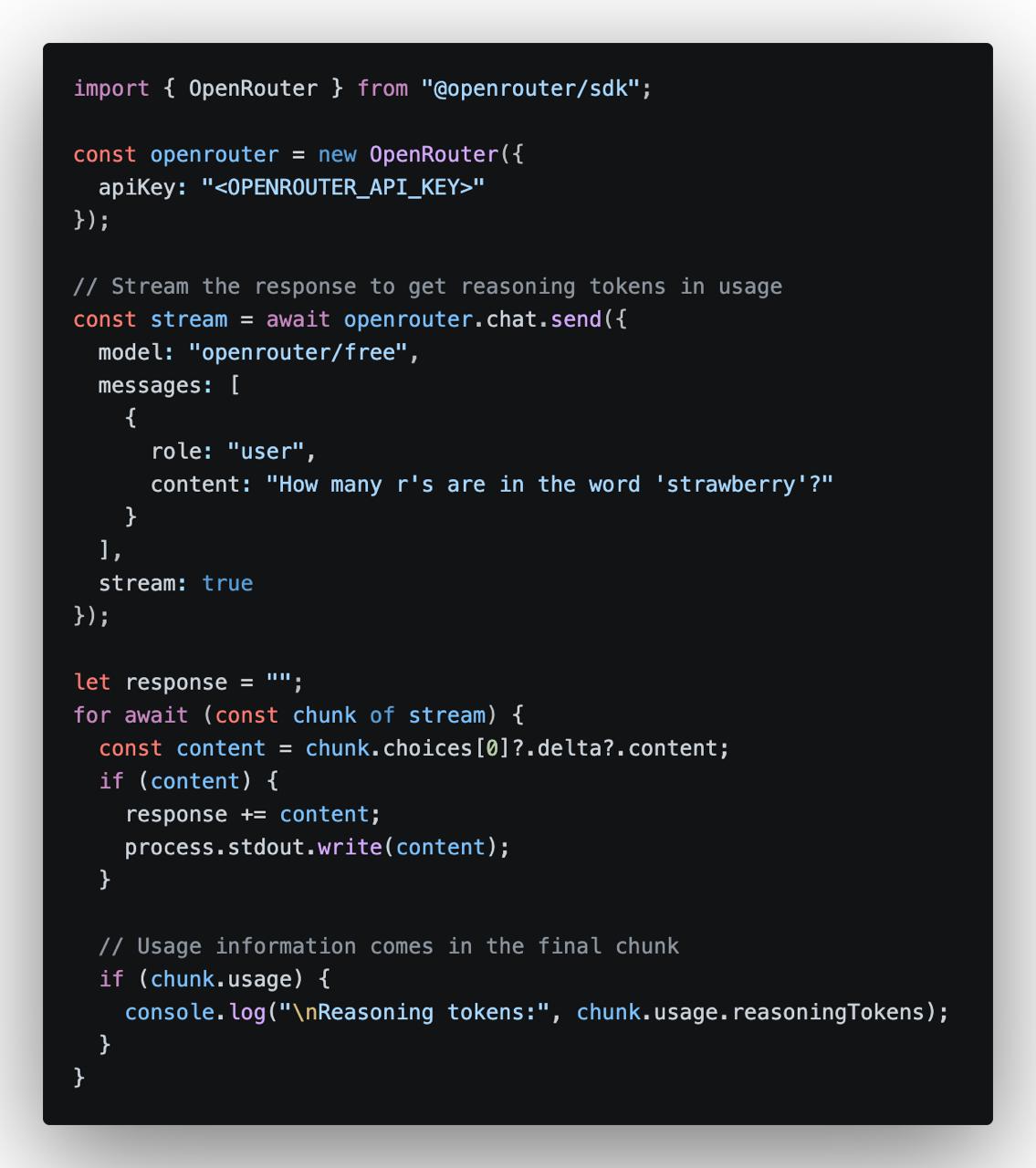
OpenRouter allows developers to access many AI models through one OpenAI-compatible API. It also provides a selection of free models that can be used for testing, learning, personal tools, and small AI projects.
You can use free models in two ways:
Use openrouter/free and let OpenRouter automatically select an available free model.
Choose a specific model whose ID ends with :free.
What Is OpenRouter Free?
The OpenRouter Free Models Router uses this model ID:
openrouter/free
When you send a request, OpenRouter chooses a compatible free model based on current availability and the features required by your prompt.
This is the easiest option for general testing. However, the underlying model may change between requests, so the writing style and response quality may not always be identical.
A specific free model usually has an ID ending with:
:free
For example:
provider/model-name:free
Because free-model availability changes frequently, copy the current model ID directly from the OpenRouter model page instead of using an old model name from another tutorial.
Check that the API key is correct and that the request contains:
Authorization: Bearer YOUR_API_KEY
404 or No Available Provider
The selected free model may no longer be available. Copy the latest model ID from OpenRouter or switch to openrouter/free.
429 Too Many Requests
You have reached a rate limit or daily free-model allowance. Wait before retrying and add request limits to your own application.
Is OpenRouter Free Suitable for Production?
Free models are useful for testing, small personal tools, demonstrations, and early product prototypes. They are less suitable for important production services because:
Free models may be removed or changed.
Provider capacity may be temporarily unavailable.
Response speed may vary.
The automatic free router may use different models.
Daily request limits are relatively low.
For a production application, use a stable model, add fallback models, set timeouts, monitor usage, and configure a maximum budget.
Security Tips
Keep the API key on the server.
Create separate keys for development and production.
Set a credit limit when creating a key.
Add user and IP rate limits to public AI endpoints.
Revoke the key immediately if it is exposed.
Do not send passwords or confidential data to free models.
Conclusion
OpenRouter is one of the easiest ways to test free AI models through a single API. Use openrouter/free when you want OpenRouter to select an available free model automatically, or choose a specific model ending in :free when you need more consistent results.
The basic process is simple: create an account, generate an API key, select a free model, and send requests to the OpenRouter OpenAI-compatible endpoint.
Free models are ideal for learning and prototyping, but their availability and limits can change. Always check the current OpenRouter model page before relying on a specific free endpoint.
Verification date: July 11, 2026. The NVIDIA Build interface, API key application process, endpoint availability, and official documentation referenced in this article were checked on this date. NVIDIA may update model availability, account requirements, rate limits, and free-access policies at any time.
NVIDIA is best known for GPUs, but the company also provides developers with hosted AI inference APIs through NVIDIA NIM and the NVIDIA Build platform.
By joining the free NVIDIA Developer Program, you can generate an NVIDIA API key and use eligible hosted NIM endpoints for AI development, experimentation, testing, and prototyping. You do not need to own an NVIDIA GPU or deploy a large language model on your own server to get started.
This guide explains how to create an NVIDIA account, generate a free NVIDIA AI API key, select an available model, test the key with cURL, and connect NVIDIA NIM to Python, Node.js, PHP, and OpenAI-compatible applications.
Important: NVIDIA describes these hosted APIs as free serverless APIs for development and as free NIM API access for prototyping. Free access should not be interpreted as a permanent, unlimited, production-grade service-level agreement.
What Is an NVIDIA AI API Key?
An NVIDIA AI API key is a credential used to authenticate requests sent to supported NVIDIA-hosted AI endpoints.
A generated key normally begins with the following prefix:
Many NVIDIA-hosted large language model endpoints use an API structure compatible with the OpenAI Chat Completions format. This means an application that already supports a custom OpenAI-compatible provider can often connect to NVIDIA by changing three values:
The API base URL
The API key
The model identifier
What Is NVIDIA NIM?
NVIDIA NIM, or NVIDIA Inference Microservices, is a collection of optimized inference services designed to simplify the deployment and use of AI models.
Instead of manually downloading model weights, configuring CUDA libraries, selecting an inference engine, and maintaining a GPU server, developers can use a standardized API to send prompts and receive model responses.
Depending on the model and licensing conditions, NIM can be used through:
NVIDIA-hosted serverless API endpoints
Downloadable NIM containers
Cloud GPU infrastructure
Private data centers
NVIDIA RTX workstations
Enterprise AI infrastructure
For this tutorial, we are using the NVIDIA-hosted development endpoints available through NVIDIA Build.
NVIDIA NIM APIs
What Can You Build with a Free NVIDIA AI API Key?
The NVIDIA API catalog includes multiple categories of AI models and services. The exact selection changes over time, but available categories may include:
Text generation and conversational AI
Reasoning models
Code generation and code analysis
Vision-language models
Image and visual-content processing
Embedding models
Reranking models
Speech and audio processing
Safety and moderation models
Biology, chemistry, climate, and scientific AI models
Typical development projects include:
AI chatbots
Customer-support assistants
Retrieval-augmented generation systems
Document summarization tools
Code assistants
WordPress AI plugins
Laravel or Node.js AI applications
Semantic search engines
Internal knowledge-base assistants
AI agent prototypes
Requirements
To apply for an NVIDIA API key, you generally need:
A working email address
An NVIDIA account
Membership in the NVIDIA Developer Program
A modern web browser
Acceptance of the applicable NVIDIA terms
Account-verification requirements can vary by region, account status, and NVIDIA’s current fraud-prevention policies. Follow the instructions displayed during registration.
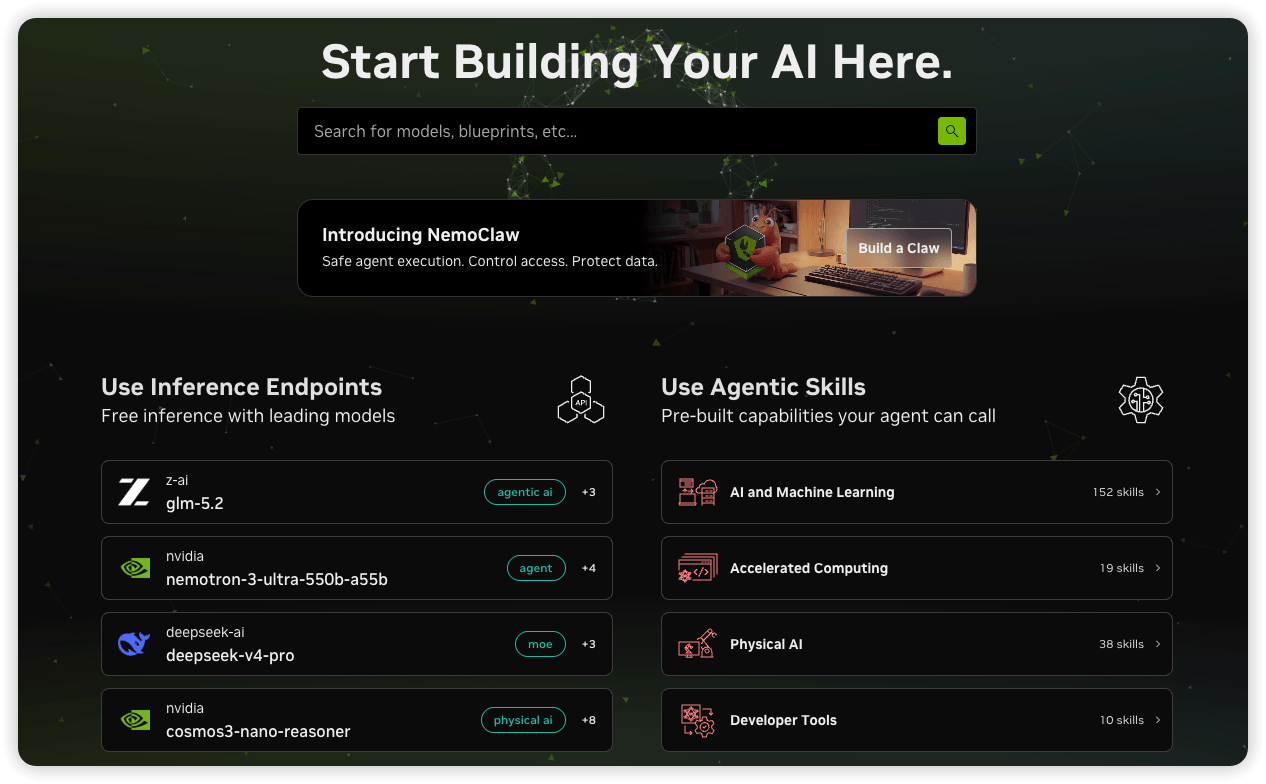
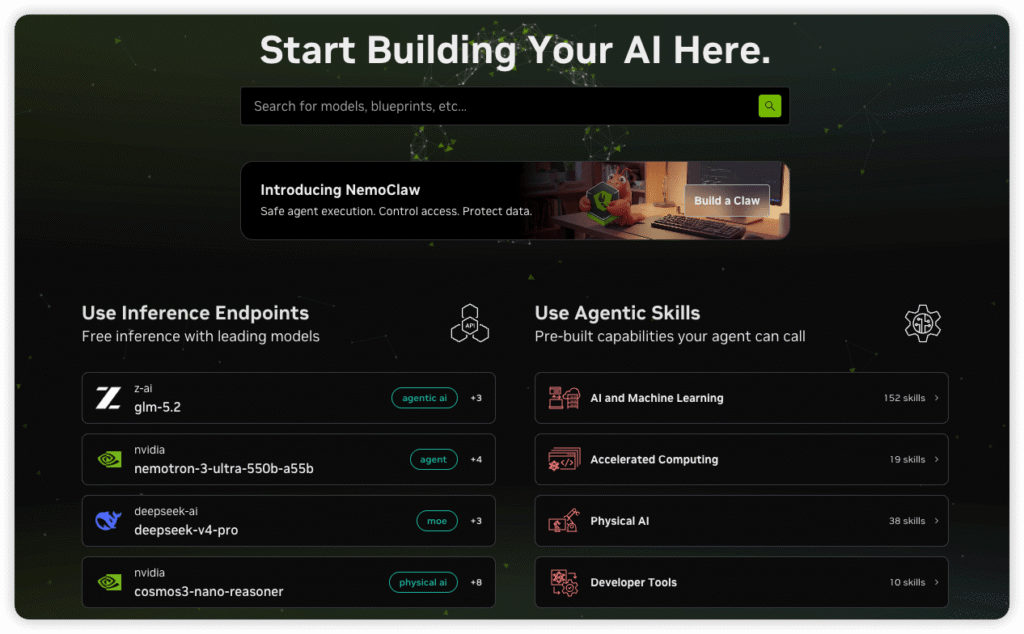
NVIDIA Build is the official catalog for exploring hosted AI endpoints, NIM models, blueprints, code samples, and related AI development resources.
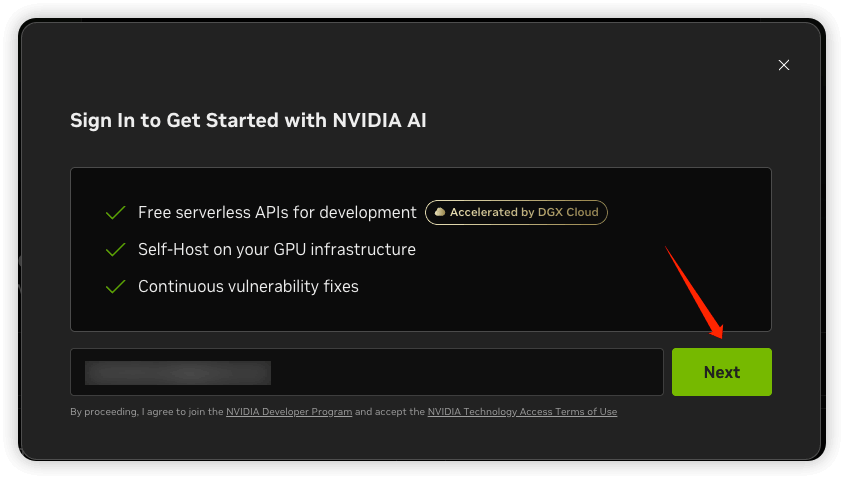
Step 2: Create or Sign In to Your NVIDIA Account
Click Sign In.
If you already have an NVIDIA account, enter your email address and continue with the login process.
If you do not have an account, enter your email address and complete the registration process. Depending on NVIDIA’s current interface, you may be asked to:
Enter your email address.
Verify your email.
The NVIDIA API key sign-in page currently states that users receive access to free serverless APIs for development and that proceeding joins the user to the NVIDIA Developer Program.
Sign in with an NVIDIA account and join the NVIDIA Developer Program.
Step 3: Open the NVIDIA API Key Settings Page
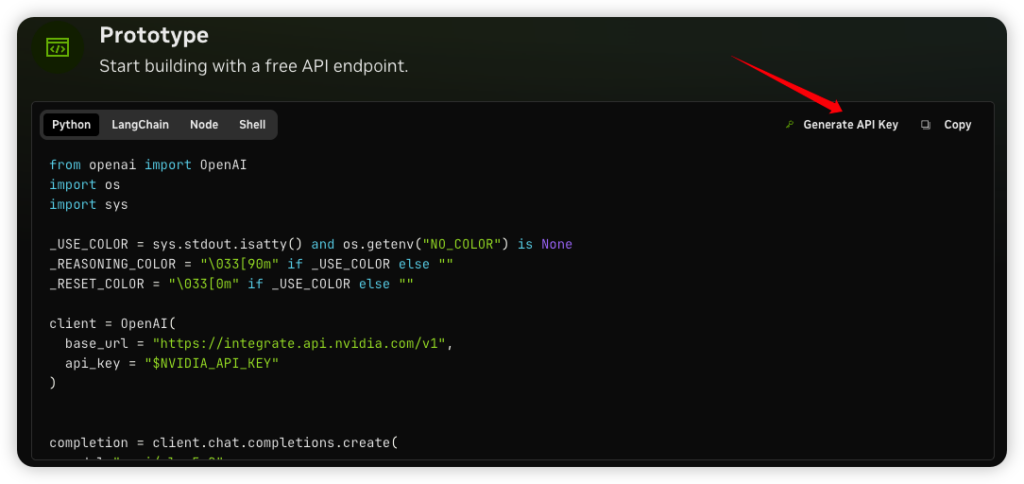
After signing in, You can normally create an API key in one of two ways:
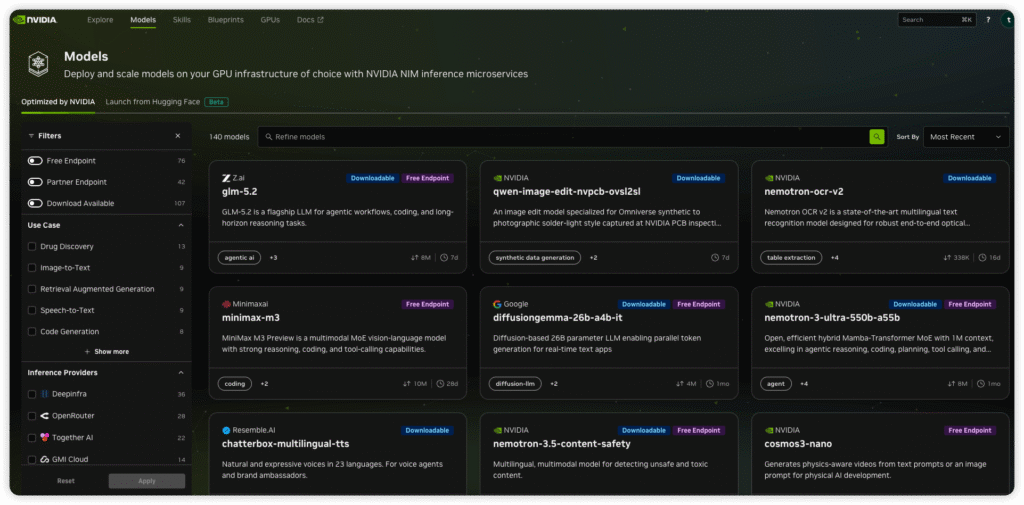
Search for a model that provides a hosted endpoint. NVIDIA may display labels such as:
Free Endpoint
Downloadable
Deprecated
Partner Endpoint
Preview
Label
Meaning
Free Endpoint
A hosted endpoint is available for eligible development or prototyping use.
Downloadable
The model or NIM can be deployed on supported infrastructure. This does not automatically mean a hosted endpoint is available.
Partner Endpoint
The endpoint may be operated or delivered through an NVIDIA partner.
Deprecated
The endpoint has been retired or is scheduled for removal.
Preview
The service is intended for evaluation and may change without production-level guarantees.
Do not assume that every model shown in the catalog can be called for free. Always open the individual model page and confirm its current endpoint status.
Check each model’s current endpoint status. A model listed in the catalog is not necessarily available as a free hosted endpoint.
Step 5: Open a Model and Review Its API Example
Click an available model. A model page may contain:
An interactive prompt area
A model card
API documentation
Python examples
Node.js examples
Shell or cURL examples
LangChain examples
The exact API model identifier
A Get API Key button
The model identifier is especially important. It may look similar to:
publisher/model-name
Always copy the identifier directly from the current model page. Do not rely on an old tutorial, video, or cached model list because NVIDIA can rename, replace, update, or deprecate endpoints.
Step 6: Generate the NVIDIA API Key
Click Get API Key, Generate API Key, or the equivalent button shown in your account.
If NVIDIA asks for a key name, use a descriptive name that identifies the project or environment:
Avoid using generic names such as test for every key. Descriptive names make it easier to revoke a compromised key without affecting unrelated applications.
If the interface provides an expiration option, select an appropriate validity period based on the project. A shorter expiration period reduces the risk of abandoned credentials remaining active.
Step 7: Copy and Secure the Key
After the key is generated, copy it immediately and store it securely.
nvapi-xxxxxxxxxxxxxxxxxxxxxxxxxxxxxxxx
Do not place the real key in:
Public GitHub repositories
Browser-side JavaScript
Public WordPress source code
Blog screenshots
Forum posts
Application error messages
Publicly accessible log files
Unencrypted configuration files
On Linux or macOS, store the key in an environment variable:
Testing with cURL is the fastest way to confirm that the account, key, endpoint, and model identifier are working before integrating the API into an application.
For OpenAI-compatible NVIDIA-hosted LLM endpoints, the commonly used base URL is:
Never hard-code a production API key directly in a public WordPress plugin or theme file. Use a server-side environment variable or a protected secret-management system.
Connect NVIDIA NIM to an OpenAI-Compatible Application
Many AI clients and frameworks support custom OpenAI-compatible providers. The typical configuration is:
API Base URL:
https://integrate.api.nvidia.com/v1

API Key:
nvapi-xxxxxxxxxxxxxxxxxxxxxxxx

Model:
REPLACE_WITH_THE_CURRENT_MODEL_ID
This can work with compatible chat interfaces, RAG tools, agent frameworks, workflow platforms, and custom applications.
However, compatibility is not guaranteed for every feature. A third-party application may expect:
A specific response format
A working /v1/models endpoint
Tool-calling support
Structured-output support
A specific multimodal message format
Parameters that the selected NVIDIA model does not support
Always test the official model-page example first. Once that succeeds, configure the same endpoint, model ID, and parameters in the third-party application.
How to Choose an NVIDIA AI Model
General Chat and Writing
Choose a general instruction-following model for:
Chatbots
Article drafting
Summarization
Translation
Customer support
Information extraction
Reasoning
Choose a reasoning-oriented model for:
Multi-step analysis
Mathematics
Complex coding problems
Planning
Agent workflows
Code Generation
Choose a coding model for:
Generating code
Debugging
Refactoring
Writing tests
Creating SQL queries
Explaining source code
Vision
Choose a vision-language model for:
Image understanding
Screenshot analysis
Chart interpretation
Visual question answering
OCR post-processing
Embeddings and Reranking
Choose an embedding or reranking model for:
Semantic search
RAG pipelines
Document retrieval
Similarity matching
Search-result reranking
Is the NVIDIA API Really Free?
NVIDIA’s official developer page currently describes free access to NIM API endpoints for prototyping, powered by NVIDIA infrastructure. The NVIDIA Build API key page also advertises free serverless APIs for development.
The safest interpretation is:
NVIDIA provides eligible developers with free hosted API access for development, learning, experimentation, testing, and prototyping, subject to current model availability, access policies, rate limits, and applicable terms.
Do not assume that the service includes:
Unlimited production traffic
A guaranteed request rate for every model
A permanent endpoint for every model
A formal production SLA
Unlimited tokens or inference credits
Automatic commercial-production rights for every model
Older NVIDIA forum posts and third-party tutorials may mention fixed credit allocations or a specific request-per-minute value. These figures have changed over time and may not apply uniformly to every model or account in 2026.
A June 2026 NVIDIA forum discussion indicated that free-tier rate limits can depend on the model, use case, and current platform traffic. For this reason, your application should rely on actual HTTP responses and current account information rather than assuming a universal rate limit.
Development Access vs. Production Deployment
Usage Type
Typical Purpose
Important Consideration
Hosted free endpoint
Learning, testing, evaluation, and prototyping
Subject to model availability, free-access policies, and rate limits
Self-hosted NIM
Private development or controlled infrastructure
You provide the GPU infrastructure and must comply with applicable licensing
Enterprise production
Commercial workloads requiring support and production guarantees
May require NVIDIA AI Enterprise licensing and production infrastructure
Before using an endpoint in a commercial production service, verify:
The NVIDIA service terms
The selected model’s license
Data-processing and privacy requirements
Production-use restrictions
Rate limits
Support availability
Required enterprise licensing
Common NVIDIA API Errors
401 Unauthorized
A 401 response usually means the API could not authenticate the request.
Check the following:
The API key was copied correctly.
The key does not contain leading or trailing spaces.
The key has not expired.
The key has not been revoked.
The request includes the Bearer prefix.
Correct header:
Authorization: Bearer nvapi-xxxxxxxx
Incorrect header:
Authorization: nvapi-xxxxxxxx
403 Forbidden
Possible causes include:
The account has not completed verification.
The selected model is unavailable to the account.
The endpoint has regional or policy restrictions.
Updated terms have not been accepted.
The selected model is not available as a hosted endpoint.
404 Model Not Found
A 404 or model-not-found response can occur when:
The model ID is misspelled.
The display name was used instead of the API model ID.
The model version has changed.
The endpoint has been deprecated.
A self-hosted model ID was used with a hosted endpoint.
Return to the current NVIDIA model page and copy its official Shell or Python example.
429 Too Many Requests
A 429 response means the request was rate-limited or the current usage allowance was exceeded.
A production-quality client should implement:
Exponential backoff
Random jitter
Concurrency limits
Request queues
Response caching
Maximum retry counts
Fallback behavior
Example Python retry logic:
import os
import random
import time

from openai import OpenAI, RateLimitError


client = OpenAI(
    api_key=os.environ["NVIDIA_API_KEY"],
    base_url="https://integrate.api.nvidia.com/v1",
)

for attempt in range(5):
    try:
        response = client.chat.completions.create(
            model="REPLACE_WITH_THE_CURRENT_MODEL_ID",
            messages=[
                {
                    "role": "user",
                    "content": "Hello",
                }
            ],
            max_tokens=100,
        )

        print(response.choices[0].message.content)
        break

    except RateLimitError:
        if attempt == 4:
            raise

        delay = (2 ** attempt) + random.random()
        print(
            f"Rate limited. Retrying in {delay:.1f} seconds."
        )
        time.sleep(delay)
400 Bad Request
A 400 response usually indicates an invalid request. Common causes include:
Malformed JSON
An unsupported parameter
An invalid message structure
A token limit that is too high
An invalid temperature value
An incorrect multimodal input format
Start with the exact example shown on the model’s API page. Modify one parameter at a time after the original example works.
Timeouts
A request may take longer when the model is busy, the prompt is large, the requested output is long, or the selected model performs extensive reasoning.
Configure reasonable connection and response timeouts:
No. NVIDIA-hosted endpoints run remotely. Your computer only sends HTTPS requests and receives responses.
Do I need to install CUDA?
No. CUDA is not required when you are calling an NVIDIA-hosted endpoint through its web API.
Is a credit card required?
The NVIDIA Build sign-in page currently advertises free serverless APIs for development. The basic NVIDIA Developer Program registration and hosted development access do not normally require deploying paid cloud GPU infrastructure. Account requirements can change, so follow the current registration interface.
Can one API key call multiple models?
A key can generally authenticate requests to multiple models that the account is authorized to access. However, each model still has its own endpoint status, supported parameters, availability, and usage conditions.
Can I put the API key in a WordPress page?
No. Never expose the key in a page, block, shortcode output, or browser-side JavaScript. Send the request from PHP on the WordPress server.
Can I use the free endpoint in a commercial application?
The free hosted endpoints are primarily described as development and prototyping services. Before launching a commercial production workload, verify the current NVIDIA terms, model license, production-use conditions, privacy requirements, and any NVIDIA AI Enterprise licensing requirements.
Why is a model from an older tutorial no longer available?
NVIDIA regularly changes its model catalog. A model may be renamed, updated, replaced, restricted, or deprecated. Always use the current model catalog rather than copying an old model ID.
Is there a universal requests-per-minute limit?
You should not assume one universal limit. NVIDIA forum guidance published in 2026 indicates that free-tier rate limits can depend on the model, use case, and current platform traffic. Handle HTTP 429 responses and inspect the latest account and model documentation.
Store the key in a server-side environment variable.
Test the endpoint with cURL.
Integrate it with Python, Node.js, PHP, or another compatible client.
Add authentication, rate limiting, retries, caching, and monitoring.
Recheck licensing and production requirements before commercial deployment.
Conclusion
NVIDIA Build provides one of the easiest ways to experiment with hosted AI models without purchasing a GPU or deploying an inference server.
The basic workflow is straightforward: create an NVIDIA account, join the Developer Program, choose an eligible model, generate an nvapi- key, and test the API with the example provided on the model page.
The API is especially useful for evaluating models, creating prototypes, building RAG demonstrations, testing AI agents, and adding experimental AI features to Python, Node.js, PHP, Laravel, or WordPress projects.
Remember that model availability and free-access rules can change. Treat the NVIDIA Build interface and official NVIDIA documentation as the authoritative sources, protect the API key on the server, and verify the licensing requirements before moving a prototype into production.
ChatGPT can support many time-consuming SEO tasks, including keyword research, content planning, on-page optimization, content refreshing, link building, and readability improvement.
However, the quality of the result depends heavily on the prompt. A vague instruction such as “write an SEO article” often produces generic content. A stronger prompt defines the target keyword, audience, search intent, structure, tone, length, and expected output format.
Below are practical ChatGPT prompts that you can adapt to your own website, client project, or content workflow.
Before Using ChatGPT for SEO
ChatGPT should be treated as an SEO assistant rather than a replacement for professional judgment.
Always review AI-generated content for:
Factual accuracy
Search intent alignment
Originality
Natural keyword usage
Brand voice
Outdated information
Unsupported statistics or claims
You should also verify keyword data, search volume, rankings, backlinks, and competitor information with appropriate SEO tools. ChatGPT may help organize and interpret data, but it should not invent current search metrics.
For developers or website owners who want to automate content-related tasks without immediately paying for a commercial AI API, see these guides:
These services can be useful for testing SEO tools, content assistants, WordPress integrations, and small automation projects. Free access, model availability, and usage limits may change, so they are generally better suited to experimentation and prototyping than critical production systems.
1. SEO Content Outline Prompts
A detailed outline helps ensure that an article covers the topic comprehensively without becoming repetitive.
Prompt: Create a Competitor-Based SEO Outline
Analyze the top-ranking pages for the keyword “[TARGET KEYWORD]” and create a detailed outline for a 2,000-word article.

Include:

- The likely search intent
- A recommended H1
- Relevant H2 and H3 headings
- Suggested word count for each section
- Important subtopics covered by competing pages
- Missing angles that could make the article more useful
- A conclusion
- An FAQ section based on common search questions

Keep the headings natural and descriptive. Do not repeat the exact target keyword unnaturally in every heading.

Split the outline into Part 1 and Part 2.
If your AI tool has browsing access, you can request an analysis of current search results. Without browsing access, provide the competing page titles, URLs, or extracted headings yourself.
Prompt: Create a Beginner-Friendly Outline
Create an SEO content outline for a beginner’s guide to yoga.

The article should cover:

- What yoga is
- Basic yoga poses
- Physical and mental benefits
- Common beginner mistakes
- Safety tips
- A simple weekly routine

Target keyword: “yoga for beginners”

Also provide:

- Five SEO title options
- A meta description under 155 characters
- Suggested H2 and H3 headings
- Relevant FAQs
- Recommended internal-link topics
2. Keyword Research Prompts
ChatGPT can help generate seed keywords and organize ideas, but it cannot reliably provide current search volume, competition, or ranking difficulty unless connected to a live data source.
Prompt: Generate Related Keywords
Generate a comprehensive list of keywords related to “[TARGET KEYWORD].”

Organize them into:

- Primary keywords
- Secondary keywords
- Long-tail keywords
- Question-based keywords
- Informational keywords
- Commercial keywords
- Transactional keywords
- Related entities and concepts

Remove obvious duplicates and group keywords with the same search intent.
Prompt: Build Keyword Clusters
Group the following keywords into topical clusters based on search intent and semantic similarity:

[PASTE KEYWORD LIST]

For each cluster, provide:

- A suggested pillar-page topic
- Supporting article ideas
- Primary keyword
- Secondary keywords
- Search intent
- Recommended content format

Flag keywords that are likely to compete with one another if published as separate pages.
Prompt: Find Long-Tail Keywords
Generate 30 long-tail keyword ideas related to “[TARGET TOPIC].”

Focus on keywords that indicate:

- A specific problem
- A comparison
- A beginner question
- A purchasing decision
- A local requirement
- A use case

Do not provide estimated search volume unless verified data is available.
3. SEO Topic Ideation Prompts
Use these prompts when planning a content calendar or identifying supporting topics around a core service.
Prompt: Generate Article Ideas
Suggest five high-potential SEO article topics for a yoga studio.

Core topics:

- Home yoga workouts
- Yoga for flexibility

For each topic, include:

- Suggested title
- Primary keyword
- Related long-tail keywords
- Search intent
- Target audience
- Recommended article angle
- Suggested call to action
Prompt: Find Content Gaps
I have already published articles about the following topics:

[PASTE EXISTING ARTICLE TITLES]

My main service or product is:

[DESCRIBE SERVICE]

Identify 15 relevant content gaps.

Exclude topics that substantially overlap with my existing articles. Group the recommendations by awareness, consideration, and conversion-stage search intent.
4. Search Intent Analysis Prompts
Understanding why someone searches for a keyword is more important than repeating the keyword throughout the page.
Prompt: Classify Search Intent
Analyze the likely search intent behind the keyword “[TARGET KEYWORD].”

Determine whether the primary intent is:

- Informational
- Navigational
- Commercial investigation
- Transactional
- Local

Explain what the user is probably trying to accomplish, what content format would best satisfy the query, and which sections should appear near the top of the page.
Prompt: Compare Similar Keywords
Compare the search intent of these keywords:

- [KEYWORD 1]
- [KEYWORD 2]
- [KEYWORD 3]

Explain whether they should target one page or separate pages.

Consider:

- Intent overlap
- Expected content format
- Audience stage
- Risk of keyword cannibalization
- Recommended internal-link relationship
5. SEO Content Writing Prompts
For better results, generate articles section by section instead of requesting an entire long-form article in one response.
Prompt: Write an Article Section
Write the section titled “[SECTION HEADING]” for an article targeting “[TARGET KEYWORD].”

Requirements:

- Audience: [TARGET AUDIENCE]
- Search intent: [SEARCH INTENT]
- Length: approximately [WORD COUNT] words
- Tone: [TONE]
- Include practical details and examples
- Use the target keyword only where natural
- Incorporate these related terms when relevant: [RELATED TERMS]
- Avoid generic introductions, filler, repetition, and unsupported claims
- Do not write the conclusion or sections outside this heading
Prompt: Improve Experience and Credibility
Review the following article and identify places where it could demonstrate stronger practical experience, expertise, and trustworthiness:

[PASTE ARTICLE]

Recommend specific improvements, such as:

- First-hand observations
- Original examples
- Clearer methodology
- Expert review
- Source attribution
- Author credentials
- Limitations or risks
- Updated screenshots or test results

Do not invent personal experience, qualifications, customer results, or statistics.
6. On-Page SEO Optimization Prompts
Avoid rigid keyword-density targets. A fixed instruction such as “use the keyword at exactly 3% density” can make an article repetitive and unnatural.
A better approach is to optimize for relevance, semantic coverage, and readability.
Prompt: Optimize an Existing Draft
Optimize the following article for the keyword “yoga for flexibility” without keyword stuffing:

[PASTE DRAFT]

Improve:

- Search intent alignment
- Title and introduction
- Heading structure
- Natural use of the primary keyword
- Related terminology
- Long-tail keyword coverage
- Paragraph length
- Readability
- Internal-link opportunities
- FAQ coverage

Preserve accurate and useful information. Highlight any statements that require fact-checking.
Prompt: Create SEO Metadata
Create five optimized title tags and three meta descriptions for the following page:

Page topic: [TOPIC]

Primary keyword: [KEYWORD]

Audience: [AUDIENCE]

Search intent: [INTENT]

Keep title tags concise and distinct. Keep each meta description under approximately 155 characters and include a clear benefit without using clickbait.
Prompt: Improve Heading Structure
Review the headings below and reorganize them into a logical H1, H2, and H3 hierarchy:

[PASTE HEADINGS]

Fix:

- Duplicate headings
- Unclear hierarchy
- Missing subtopics
- Keyword stuffing
- Headings that do not match the section content

Return the revised heading structure only.
7. Readability and Editing Prompts
AI is particularly useful for simplifying difficult writing and removing repetitive phrasing.
Prompt: Simplify Complex Content
Rewrite the following content for a general audience at approximately a seventh- to eighth-grade reading level:

[PASTE CONTENT]

Use:

- Shorter sentences
- Familiar words
- Clear transitions
- Short paragraphs
- Direct explanations

Preserve technical accuracy and define any specialist terms that cannot be removed.
Prompt: Improve Awkward Writing
Edit the following draft to improve clarity, flow, and natural phrasing:

[PASTE DRAFT]

Remove:

- Repetition
- Unnecessary filler
- Awkward transitions
- Excessive passive voice
- Generic AI-style phrases

Preserve the original meaning, factual claims, and tone.
Prompt: Make Content More Engaging
Improve the following article by suggesting appropriate places to add:

- Two verified statistics
- One simple analogy
- One practical example
- One short checklist
- An FAQ section

[PASTE ARTICLE]

Do not invent statistics. Clearly mark where an external source is required.
8. Internal Linking Prompts
Internal links help users discover related content and help search engines understand the relationship between pages.
Prompt: Find Internal-Link Opportunities
Review the following article and identify internal-link opportunities:

[PASTE ARTICLE]

Available pages:

[PASTE PAGE TITLES AND URLS]

Return a table containing:

- Source sentence or section
- Recommended destination page
- Natural anchor text
- Reason the link is relevant

Avoid using the same anchor text repeatedly and do not suggest irrelevant links.
Prompt: Build a Topic-Cluster Linking Plan
Create an internal-linking plan for the following pillar page and supporting articles:

Pillar page: [TITLE AND URL]

Supporting pages:

[LIST TITLES AND URLS]

Explain which pages should link to one another and recommend descriptive anchor text. Prioritize useful navigation rather than adding links solely for SEO.
9. External Link and Source Prompts
External links should support factual claims and direct readers to authoritative resources.
Prompt: Recommend External Sources
Recommend three authoritative external sources for an article about “[TOPIC].”

The sources should:

- Support important factual claims
- Come from primary or highly trusted organizations
- Not directly compete with the article’s main commercial objective
- Be current where recency matters

For each source, provide:

- The organization or publication
- The type of information it supports
- Recommended anchor text
- The section where it should be cited

Do not invent URLs or sources.
10. Link-Building Prompts
ChatGPT can help personalize outreach, but mass-produced emails usually perform poorly.
Prompt: Create a Personalized Outreach Email
Write a concise outreach email to the editor of “[WEBSITE NAME].”

I want to recommend my resource:

[RESOURCE TITLE AND URL]

Relevant page on their website:

[PAGE TITLE AND URL]

Explain specifically why my resource would add value for their readers. Do not use exaggerated praise, pressure, or generic phrases. Keep the email under 150 words.
Prompt: Find Linkable Asset Ideas
Suggest ten linkable asset ideas for a website in the “[INDUSTRY]” industry.

Include a mix of:

- Original research
- Calculators
- Templates
- Checklists
- Interactive tools
- Data visualizations
- Technical reference materials

For each idea, explain who might link to it and why.
11. FAQ Generation Prompts
FAQs should answer real user questions, not merely create extra keyword-heavy text.
Prompt: Generate Useful FAQs
Generate ten FAQs for an article targeting “[TARGET KEYWORD].”

Focus on:

- Common beginner questions
- Important limitations
- Costs
- Safety concerns
- Comparisons
- Implementation questions

Provide concise answers of 40–80 words. Avoid repeating information already covered in the main article.
12. Content Repurposing Prompts
One well-researched article can be adapted for several channels, but each version should match the platform.
Prompt: Create a Social Summary
Create a concise social media summary of the following article:

[PASTE ARTICLE]

Platform: X/Twitter

Maximum length: 100 words

Include:

- The main benefit
- One practical takeaway
- A reason to read the full article

Do not use misleading claims or excessive hashtags.
Prompt: Convert an Article into a Newsletter
Convert the following article into an email newsletter:

[PASTE ARTICLE]

Use:

- A concise opening
- Three key takeaways
- One practical recommendation
- A natural call to action

Keep the newsletter under 500 words and avoid copying the article introduction word for word.
13. Content Refresh Prompts
Older pages often lose traffic because examples, screenshots, tools, product details, or search intent have changed.
Prompt: Create a Content Refresh Plan
Review the following article and create a content refresh plan:

[PASTE ARTICLE]

Identify:

- Potentially outdated information
- Broken or weak references
- Missing subtopics
- Sections that are too thin
- Repetitive sections
- Opportunities for updated examples
- New FAQs
- Internal-link opportunities
- Claims requiring current verification

Prioritize the recommendations by expected impact.
14. Technical SEO Explanation Prompts
ChatGPT can explain technical SEO concepts or help analyze supplied data, but important changes should be tested before implementation.
Prompt: Explain a Technical SEO Problem
Explain the following technical SEO issue in clear language:

[DESCRIBE ISSUE]

Include:

- What the issue means
- Common causes
- How it can affect crawling, indexing, or rankings
- How to diagnose it
- Possible fixes
- Risks to consider before making changes

Provide separate recommendations for WordPress and custom-built websites where applicable.
Prompt: Review Robots.txt
Review the following robots.txt file:

[PASTE ROBOTS.TXT]

Identify directives that may accidentally block important pages, CSS, JavaScript, images, or search-engine crawlers.

Explain each problem and provide a corrected version. Do not assume that robots.txt can remove already indexed pages from search results.
A Reusable Master Prompt for SEO Content
The following template can be adapted to most SEO writing projects:
Act as an experienced SEO content strategist and editor.

Create a detailed article about “[TOPIC]” targeting the primary keyword “[PRIMARY KEYWORD].”

Project details:

- Audience: [AUDIENCE]
- Search intent: [INTENT]
- Country or market: [MARKET]
- Desired length: [WORD COUNT]
- Tone: [TONE]
- Business goal: [GOAL]

Requirements:

1. Recommend an SEO title and meta description.
2. Create a logical H1, H2, and H3 structure.
3. Cover the topic comprehensively without unnecessary repetition.
4. Use the primary keyword and related terminology naturally.
5. Include practical steps, examples, limitations, and common mistakes.
6. Add an FAQ section addressing genuine user questions.
7. Identify claims that require current sources or fact-checking.
8. Suggest relevant internal-link opportunities.
9. Avoid fabricated statistics, quotes, experience, and credentials.
10. Write for readers first rather than targeting a fixed keyword density.

Before writing the complete article, return the proposed outline for review.
Final SEO Prompt Tips
For more useful AI-generated SEO content:
Define the audience and search intent.
Provide source material whenever possible.
Include your product, service, or brand context.
Specify the required output format.
Ask the AI to identify uncertain claims.
Generate and review long articles section by section.
Avoid strict keyword-density requirements.
Fact-check statistics, quotes, product details, and current policies.
Add original expertise, examples, screenshots, or test results.
Edit the final draft so it reflects a consistent human voice.
Conclusion
ChatGPT can accelerate many SEO tasks, from keyword clustering and article planning to editing, internal linking, and content refreshing. Its greatest value is not simply producing more text—it is helping marketers organize ideas, identify gaps, and improve existing workflows.
The most effective prompts clearly define the task, audience, search intent, constraints, and desired output. AI-generated recommendations should still be reviewed by a human, supported by reliable sources, and refined with genuine experience.